How to Convert MOV to AVI on Mac (macOS 10.7 Lion to 10.15 Catalina)
Can I convert MOV to AVI using VLC? Yes, you can easily convert MOV to AVI using VLC and the process is very easy. When you want to convert MOV to AVI VLC is a good option to use since it allows you to convert your videos into various formats.
Part 1. How to Convert MOV to AVI with VLC
VLC is an open source multimedia player that works on various platforms. It can play various multimedia files in addition to audio, VCDs, DVDs, CDs and different streaming protocols. VLC can work on Windows, Mac OS, iOS, Ubuntu and Android. It is also free of ads and does not track the user's activities and information.
Step-by-step Guide on How VLC Convert MOV to AVI
Step 1. In the first section, add the file you want to convert. The second section can be used to embed a subtitle to the converted video in sync. Then click on the Convert/Stream button.
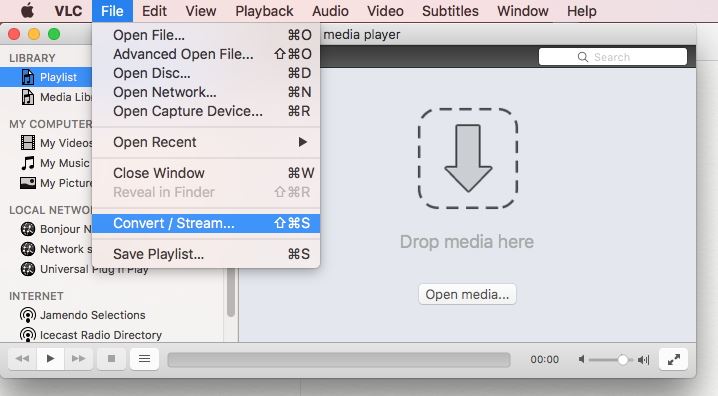
Step 2. Select the destination folder and then name it the way you want. On the profile section, select AVI. If you do not see it, click on the button that has a spanner on it whereby you can edit the selected profile. You will find the AVI option.
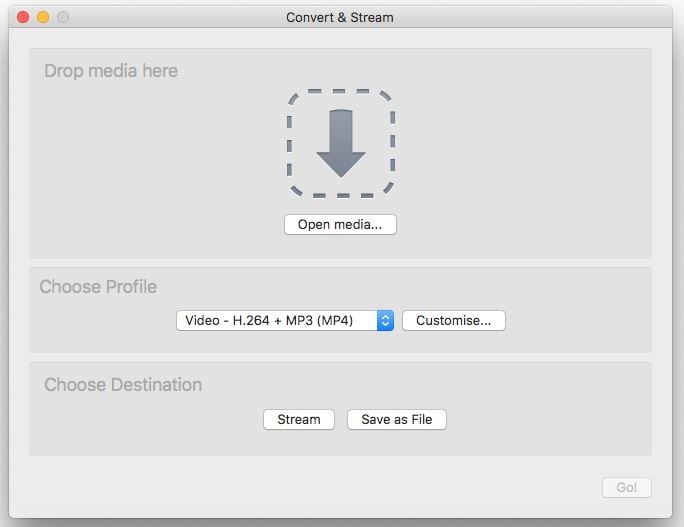
Step 3. Click on the Start button to activate MP4 to AVI conversion immediately.
Part 2. Best VLC Alternative to Convert MOV to AVI (More than convert!)
UniConverter is a simple video converter that allows the user to convert video into various formats including MP4, AVI, MOV, WAV, 3GP, M4A, OGG, FLV and MP3 among other formats. Several optimized profiles are available including Apple TV, PSP, iPod nano, iPod touch, iPod classic and iRiver PMP among other profiles. You can also crop the video to get your desired results. See more great features of iSkysoft below:
Get the Best MOV to AVI Video Converter - UniConverter
- Convert MP4 to AVI, FLV, WMV and other 150+ formats, whether it is high definition format or standard format.
- Convert video at 90X faster speed with zero quality loss.
- Download online streaming videos from 1,000+ sites such as YouTube, Metacafe, Break, Netflix, Vevo, Vimeo, etc.
- Customize your output performance of your video by editing features like Trim, Crop, Effects, Watermark, etc.
- Directly convert to mobile device models and transfer to your iPhone, iPad, Android phones and tablets with USB.
- Burn your favorite MP4/AVI video or other media files to DVD/CD as backup or copy to share with friends.
How to Convert MOV to AVI using VLC Alternative [3 Simple Steps!]
Before getting started, you can watch the video tutorial below to learn how the best VLC alternative converts MP4 to AVI first.
Step 1. Load MOV files to this MOV to AVI converter
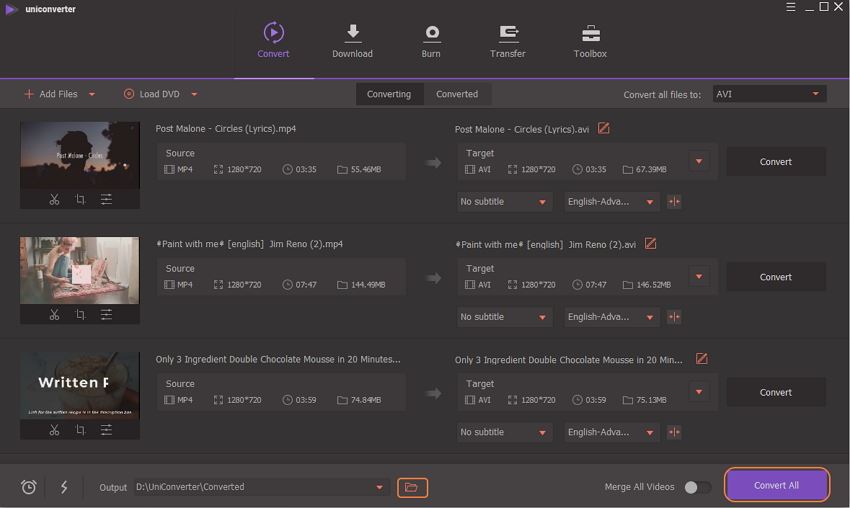
Launch the converter and click on  to load your MP4 videos, or drag and drop your MP4 files to the main window of the converter. If you have videos in your mobile devices such as iPhone, iPad, Android Phones or tablets, just sync your device and click the drop down icon beside to directly import from your mobile device.
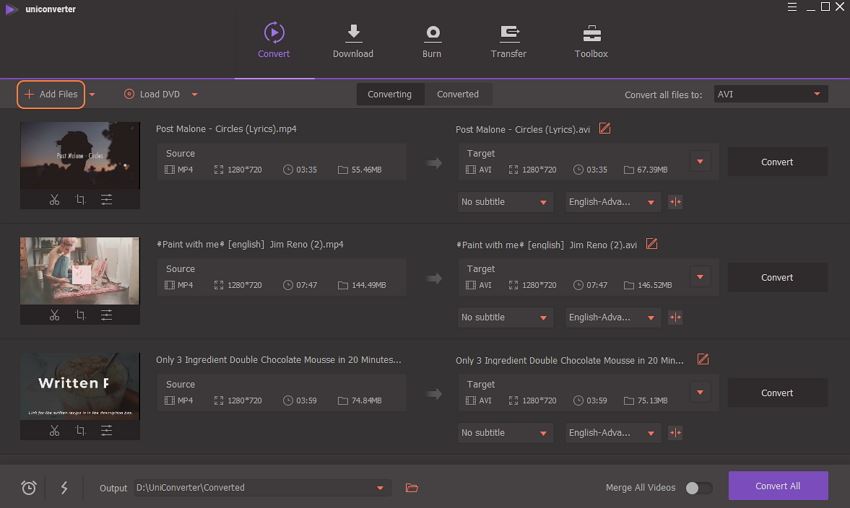
Note: Multiple MP4 files can be added at one time. It supports batch conversion.
Step 2. Choose AVI as output format
Click  besides Convert all tasks to: and go to the Video tab and choose AVI as your output format.
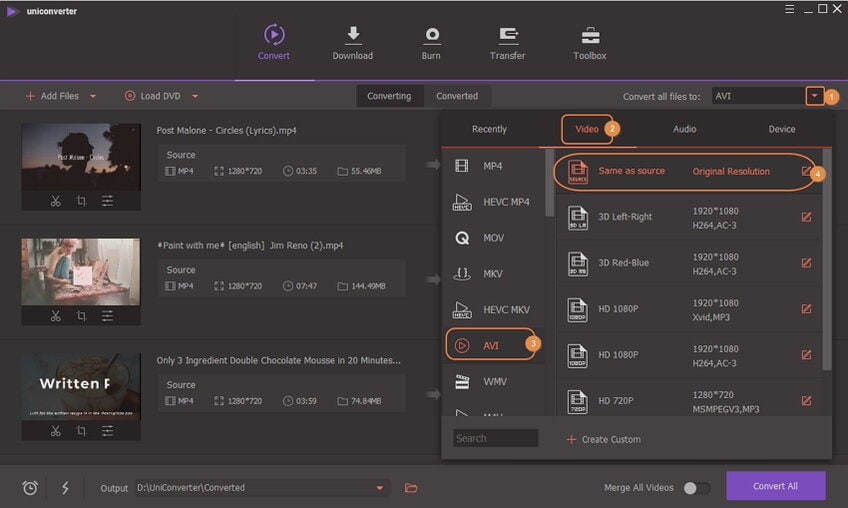
Tips: You will also see some optimized presets available for iPad, Apple TV and iPod among others. In the format tray you choose, you will see  on the right, from where you could adjust more encode settings like frame rate, bitrate, encoder, etc.
Step 3. Start Converting MOV to AVI
Once you are done with the settings, start the conversion by clicking on the Convert button located at each video clip or Convert All button at bottom right to once click convert all imported MP4 files. You can choose the destination folder under the preferences section. For conversion from AVI to MP4 format with VLC, click to get how to convert AVI to MP4 using VLC.
Brian Fisher
chief Editor