
Download & Convert YouTube Video-UniConverter
- Download video/audio from YouTube and other 10000+ video and audio sites directly with one click.
- Convert YouTube to MP3 with 100% original quality and 90x faster speed.
- Convert YouTube to other 1000+ standard audio and video formats including device optimization.
- Edit YouTube files after converting to MP3 or other formats.
- Other features include recorder, merger, compressor, and so on.
It is very painful when you listen to a nice music from YouTube, then, later on, you are restricted not to listen to it offline, simply because you have a poor network or you don't know the YouTube to MP3 converter to use to keep your mind relaxed as you'd love to play the song repeatedly. If you fall into this often, then you can explore this painkilling article and experience overwhelming happiness as you meet with the end of your suffering as we've provided 10 YouTube to MP3 converters to let you enjoy music offline regardless of where you are.
Part 1. 4 Basic YouTube to MP3 Converters You Can Choose
Loader.to
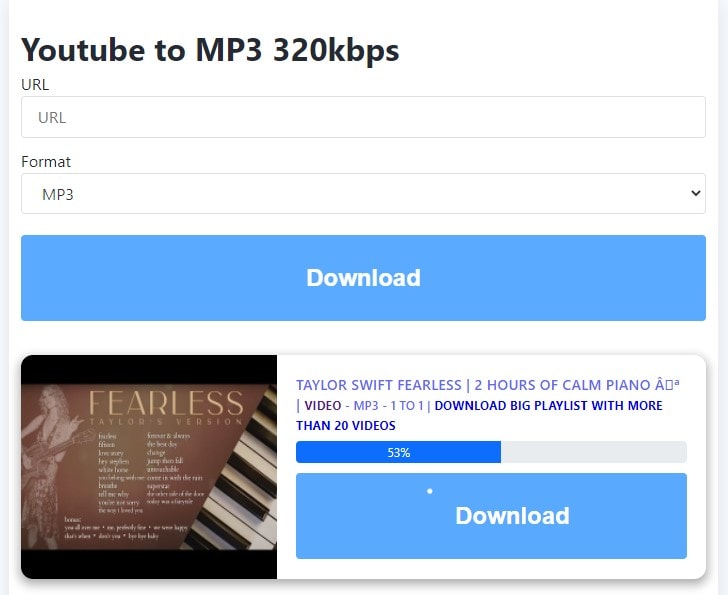
Loader.To is an online YouTube to MP3 converter that allows a user to download YouTube mp3 by ordinarily copying and pasting video URLs. Aside from the aforementioned fact, the software has proven to be effective as it supports other streaming platforms aside from YouTube. If you wish to use this software, then here are steps for you.
STEPS
As you're listening to the song on YouTube, ensure that you copy the link > then quickly load Loader.to to a browser on your device > paste the copied link to the "URL" box > choose an output format "mp3" by clicking or tapping the formats dropdown option > Click or tap "Download", then wait patiently for the file to be converted > click or tap on the next "Download" to save the converted YouTube file.
Pros
It's a free youtube to mp3 converter
It supports multiple output formats
It has an understandable user interface
Cons
Loader.To is not ads-free
It has no bit rate option
It doesn't support batch conversion
4kDownload
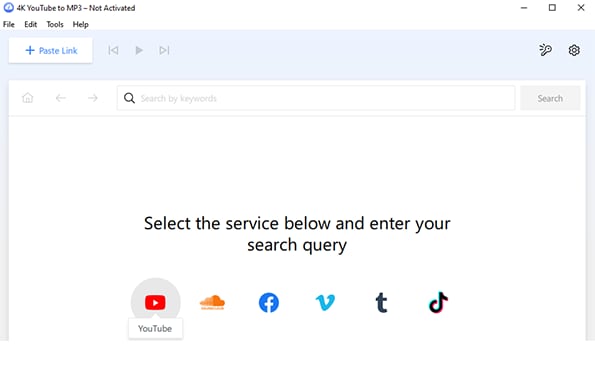
4kDownload is another great YouTube to mp3 converter, although it's not the online type as it requires users to download and install software on their PCs. Skipping the fact that the amazing YouTube to downloader extracts audio files, it also enriches users with the feature of using a built-in media player that allows them to play the already downloaded files. Without necessarily painting all the quality of this software application, you can use the step below to see for yourself.
STEPS
Immediately you have 4KDownload installed on your PC, launch the software > ensure that you've copied the link of the file you want to convert to mp3 from YouTube > paste the copied link by clicking the "Paste URL" button situated at the top left side of the interface > here nothing is required anymore, all you need to do is wait patiently for the file to be downloaded.
Pros
It requires no steep learning as it's simple to use
It has an automated downloading system
It is free to use as it supports Linux, Mac OS, and Windows OS
Cons
It doesn't support batch conversion
Users can't set bit rate, i.e., the quality they wish to download
No editing tool
Kapwing
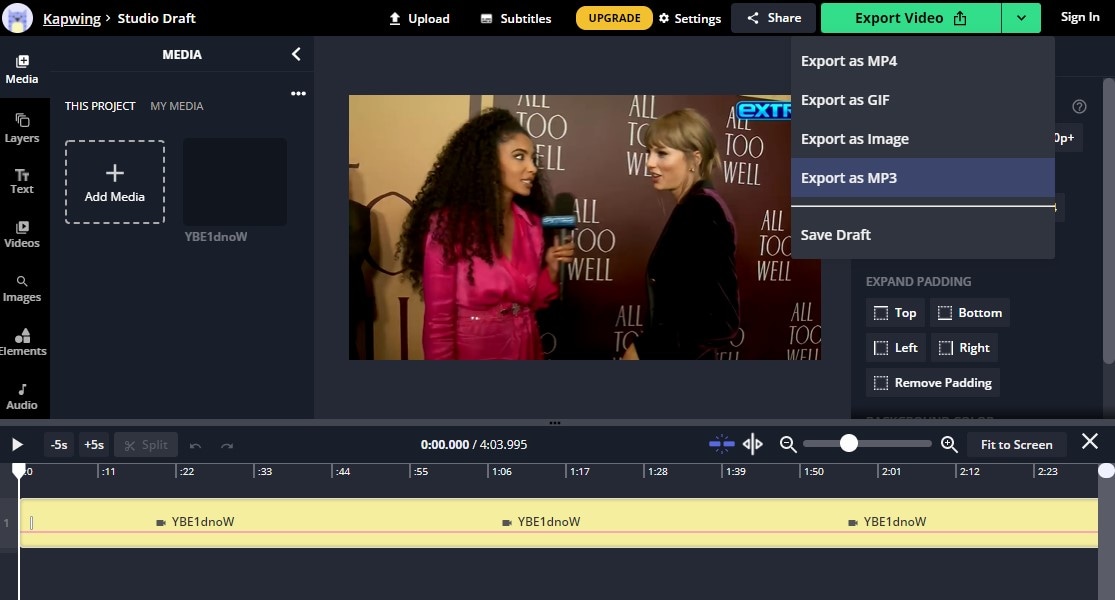
Kapwing is more of an online media working space that allows users to convert videos from YouTube into an mp3 format. Aside from our primary objective, i.e., converting YouTube to mp3, kapwing permits its user to edit video online by adding effects, subtitles, cut and trim, and more. With no long talk, if you'd like to download youtube to mp3 music using kapwing, then here are the basic guidelines you need.
STEPS
Make sure you've copied the URL of the video that you'd love to have on your device from youtube > immediately, visit kapwing > click on the menu option you'll find at the top of the loaded interface and click "Tools" and select "Convert video" from the several options > paste the copied link to the "Paste a URL" address bar > immediately you paste the link, kapwing does the favor of automatically loading the YouTube video to its interface where you allowed to edit it > Right-click on the video strip below and select "Detach Audio" from the appeared menu to set the parameters you'll see at the right side of your PC screen > Now, click the "Export Video" dropdown button > select "Export as mp3" and wait patiently for the file to be converted, then click on "Download" to save the file on your device once the conversion is done.
Pros
Kapwing possesses editing features that enable a user to enhance YouTube mp3
Users are allowed to change the speed of a YouTube mp3 file
It supports all devices, whether it's iOS, Android, Mac OS, or Windows OS
Cons
It only supports mp3 as the only audio format
It features no bit rate option
It doesn't support batch conversion
Media.io
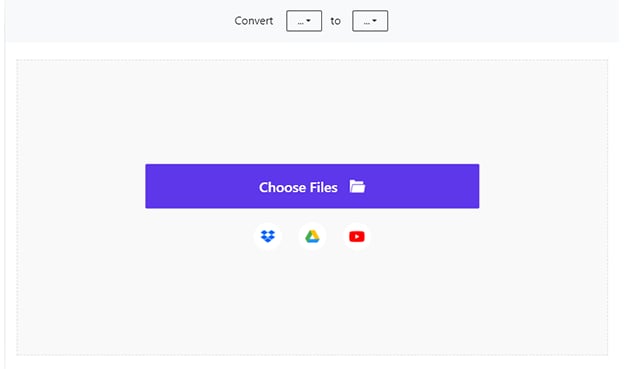
Like every other online YouTube to mp3 converter, Media.io is exceptional as it's a product of wondershare. The web-based software permits users to download videos, audio files, and other media files from different websites by copying and pasting video URLs. However, it still possesses other online media working tools you can utilize even if you're not interested in converting YouTube video to mp3. If you'd like to use this software, follow the steps below.
STEPS
The first step you need to take is – quickly copy the link of the video or song to be converted > load media.io to a browser on your device > click the "YouTube icon", paste the link in the address bar, then click "Add"> after the analysis of the link is done, click on the Format dropdown key, click the "Audio" tab, and select "mp3" as the output format. You can change the sample rate and trim the file if you want to. All you need to do is click on the "gear icon". > click on "Convert" to finish up.
Pros
Media.io support batch conversion
It supports iOS, Android, Mac OS, Windows, and other devices
It supports multiple audio formats and bit rates ranging from the lowest to the highest quality
Cons
Media.io offers a paid version
Converted files automatically disappear after 24hrs if not save
Converted files can't be saved unless you're a subscriber
For Win 7 or later (64-bit)
For macOS 10.12 or later
Part 2. 4 Advanced YouTube to MP3 Converters for Your Reference
It's obvious to see the YouTube to MP3 converters above have some limitations. Most of them are online services, and they have limited features. That's the reason we need more advanced converters to help us do more editing and have a better converting experience.
Uniconverter
Not all youtube to mp3 converters can deliver what you're looking for. But if you've got a software like the Uniconverter 13, then all you need to worry about is getting your work done as it is an integrated media workshop that contains all the required tools needed to enhance youtube to mp3 music conversion. This intuitively designed software also permits you as a user to transfer all converted YouTube mp3 to your mobile device in no time. If you'd love to get your work delivered in the best quality, then here's all you need to do.
STEP1
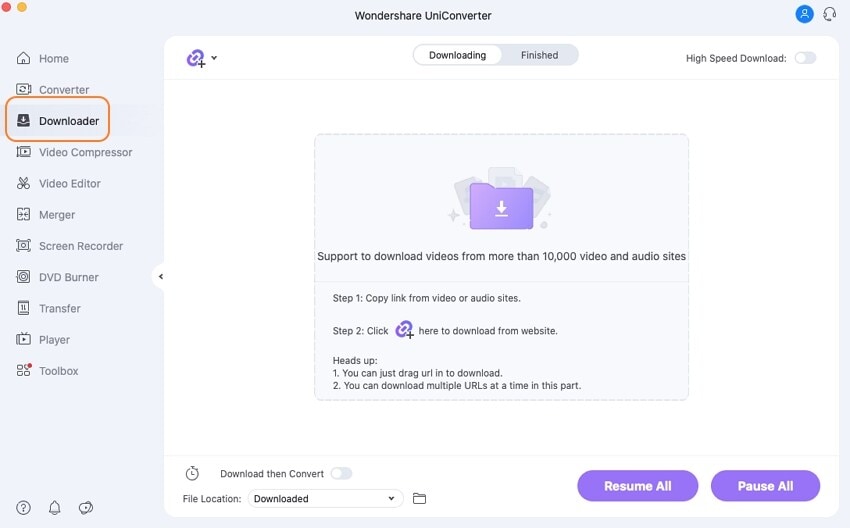
Download and install Uniconverter to your Mac or Windows PC if you don't have it. After installing the software, launch it, then click on the "Downloader" tab on the left side of the interface. If you've not copied the video URL from youtube lately, minimize Uniconverter. Go to YouTube and copy the link address.
STEP2
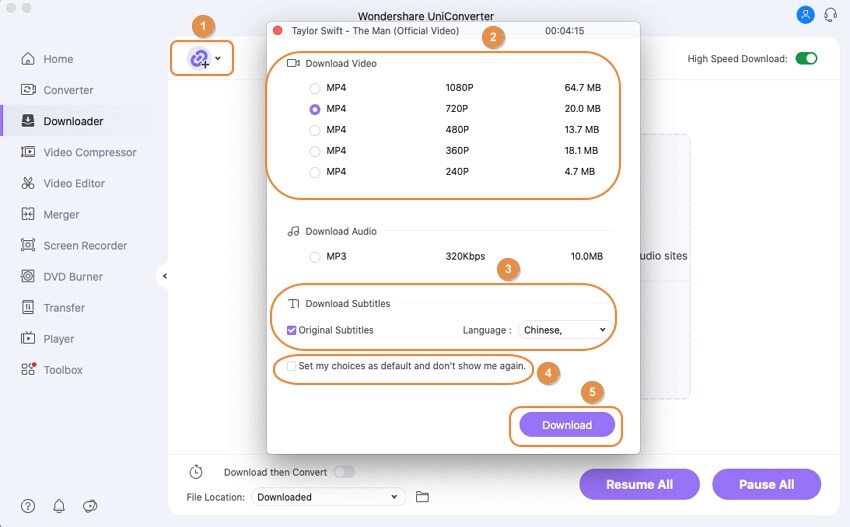
Return to Uniconverter and paste the copied link. Then wait for the downloader to analyze the pasted link. Now, a new pop-up. From the newly displayed, select the mp3 + bitrate you'd love to download under the "Download Audio" and click the purple "Download" button to start converting the file.
STEP3
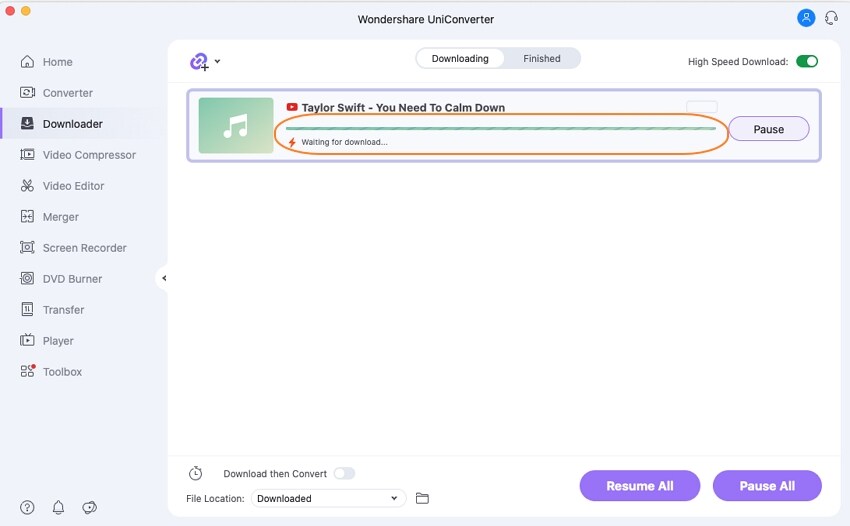
Now, wait patiently for the file to be downloaded. Once downloading is done, click on the "Finished" tab you'll see at the top of the interface to access the converted YouTube to MP3.
Pros
The software permits users to download MP3 in the highest quality
Uniconverter is the best YouTube to MP3 converter that we'll recommend for any user as it supports high-speed conversion
Users are permitted to edit the audio and still convert to other available formats
UniConverter can download 4K videos
Cons
The free version only allows you to download 1 video
Users can't download in 64kbps, which is the lowest bit rate
The high-speed conversion feature is only active to pro version users
Wondershare UniConverter 13 - Best Video Converter for Mac/Windows
5,481,435 people have downloaded it.
UniConverter supports many formats and handles conversion equally, ensuring that high quality is delivered at all times.
During the conversion process, you may add the VOB files since the program does batch conversion of files.
You can use the editing suite to make your results creative masterpieces.
This software facilitates file transfer to devices like Android and iPhone among others once the conversion is complete.
UniConverter is also capable of handling video compression hence ensures you acquire the video sizes you desire.
iTubeGo
iTubeGo is another amazingly made software you can use as a YouTube to YouTube to MP3 converter. As the software is focused on audio, video conversion, and download, you're given a chance to visit thousands of streaming and social media platforms where you're open to seeing different videos of songs, skits, movies, teachings, and more. If you're interested in this app, then follow the steps below.
STEP1
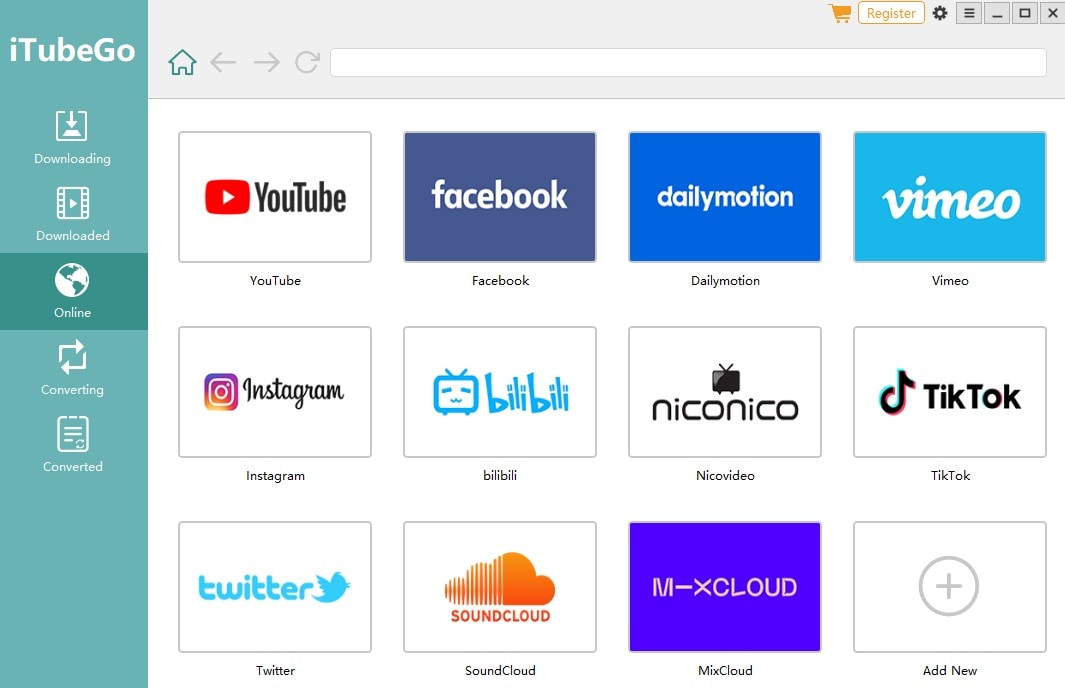
Purchase to Download and install iTubeGo on your PC. Once the software is installed, Launch it > click the "Online" tab at the left side of the displayed interface to visit YouTube just to copy the URL of the song to be converted using the built-in browser.
STEP2
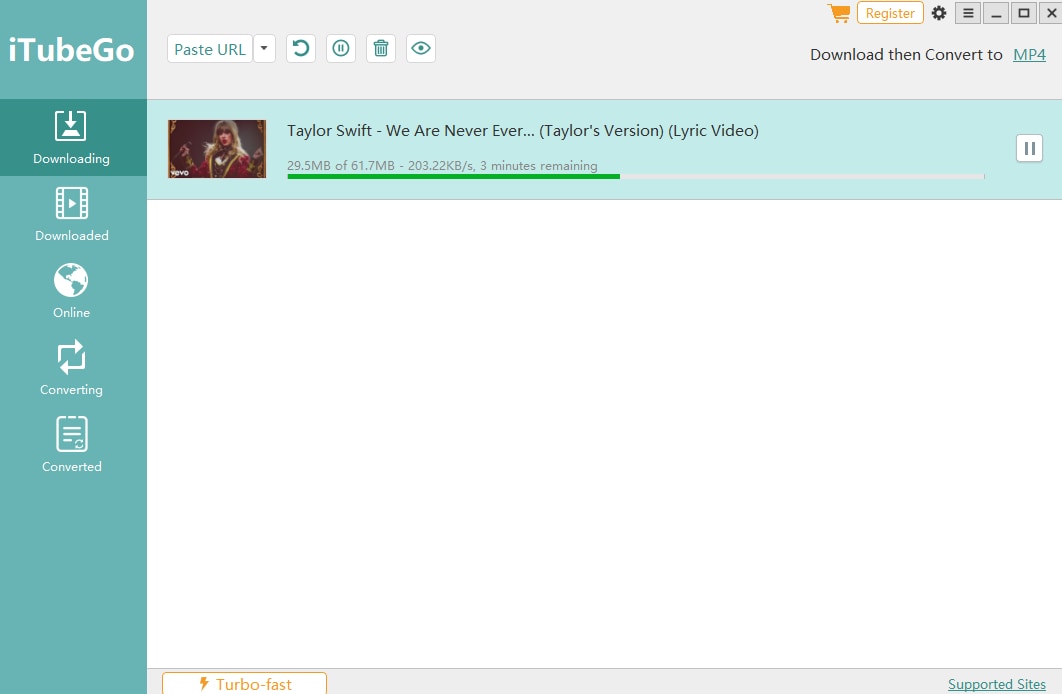
Once you've copied the link, click the "Downloading" tab also situated on the left side of the software's interface > click on the "Paste URL" dropdown and select "Download mP3" or paste the URL first, then click on "Download then Convert to" to select mp3 as the output format.
STEP3
All you need to do is wait for the youtube to mp3 file to be downloaded completely.
Pros
iTubeGo support batch conversion
It has a built-in browser that allows users to visit any site for the software
Users can trim the length of the file to be downloaded, and it also has a High-speed conversion feature
Cons
It has to be purchased
It has limited audio output formats
Users can't download at a preferred bitrate.
HitPaw
Just like video downloaders, Hit Paw video converter is another wonderfully tool to convert YouTube to MP3. In no time, if you'd like to use the software since it's packed with the gift of being able to convert and download from numerous sites, then here are steps you can follow.
STEP1
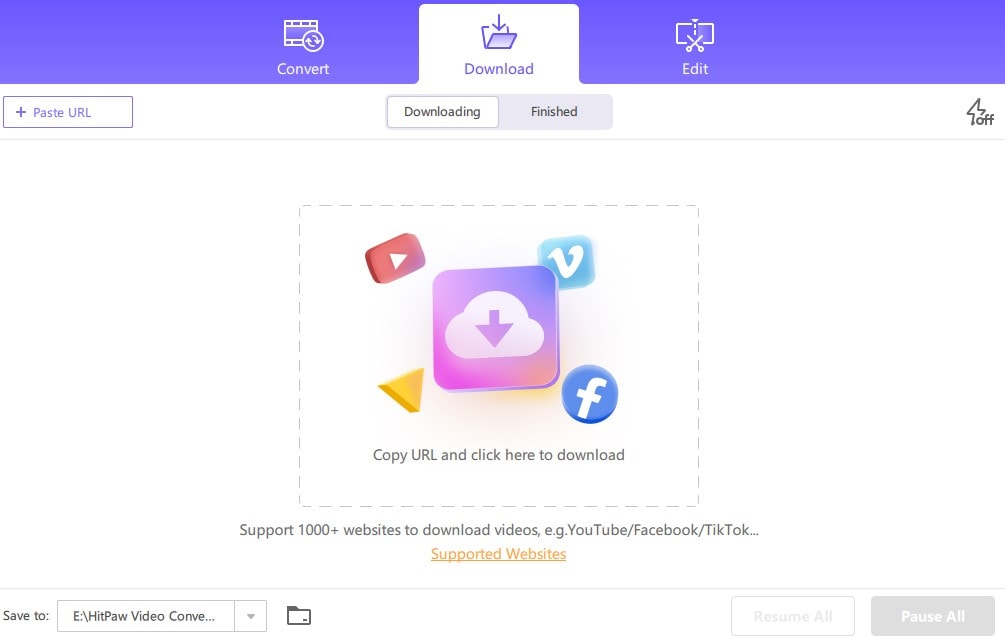
Download and install HitPaw on your PC. After installing the software, launch it and click on the "Download" tab immediately it opens.
STEP2
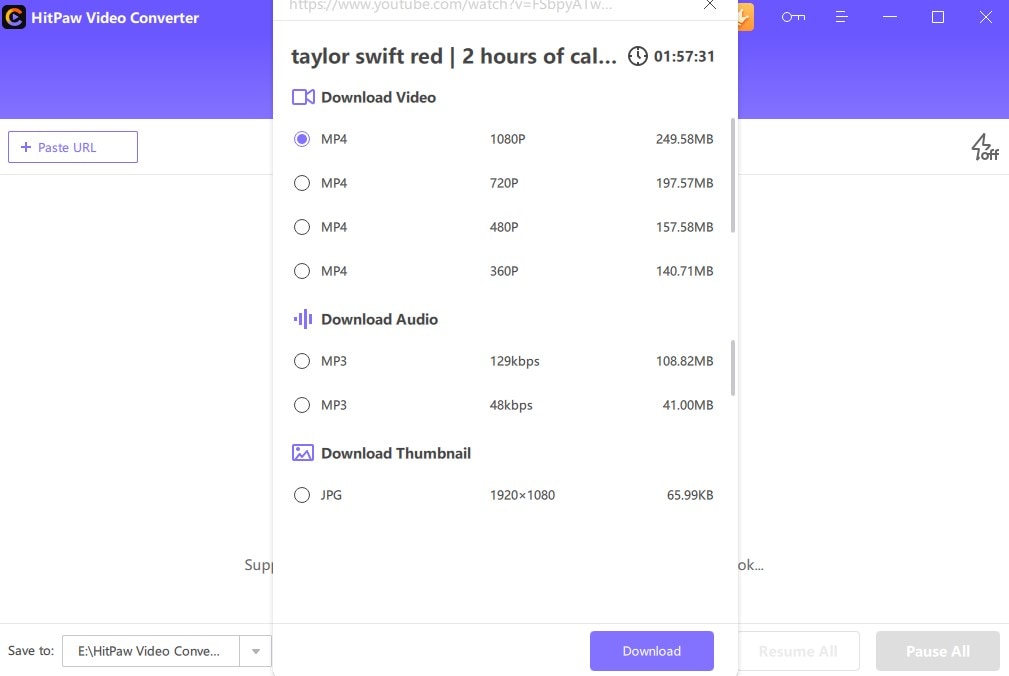
Minimize HitPaw and visit YouTube to copy the URL of the file to be downloaded. Afterward, go back to HitPaw and paste the copied link by clicking on the "+ Paste URL" button you'll see at the top left side of the interface. Then wait for HitPaw to analyze it.
STEP3
Now, you can choose the audio format with bit rate attached to it from the "Download Audio" section. After this, just click the "Download" button to convert and download the YouTube file.
Pros
HitPaw supports batch conversion and downloads
It has a couple of great video formats
HitPaw also possesses editing tools
Cons
HitPaw requires a subscription plan.
It doesn't allow you as a user to download into only MP3 format
It only supports two audio bit rate options that don't allow users to download in the highest quality
Media Human
Sometimes, human satisfaction comes with a lot of complications. That's why we are introducing Media Human as another intuitive software you can use to convert youtube videos to mp3 just in case you're not okay with the other listed software as it supports Mac OS, Windows OS, and Ubuntu Linux. Media Human is already made easy by just copying and pasting links to get the job done. If you'd love to utilize Media Human, then here are steps to follow.
STEP1
Ensure that you have the Media Human software application installed on your PC. Now, start by visiting YouTube to copy the link address of the file to be downloaded.
STEP2
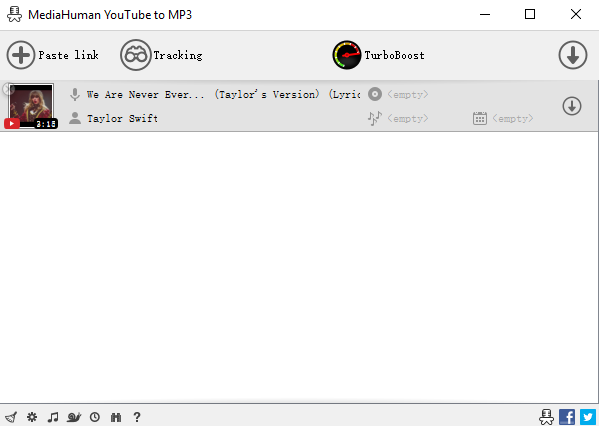
Launch Media Human, paste the copied link by clicking on the "+" at the top left corner of the software's window, wait for the pasted link to be analyzed, then click on the "Down-arrow" button on the right side of the video strip to start downloading.
STEP3
Once downloading is completed, click on the "search box" to select mp3 as your preferred format from the preference window.
Pros
It also supports batch conversion and downloads
It supports iTunes file sharing
As a user, you can download audio in the highest quality (320kbps)
Cons
No bit rate option to a preferred bit rate sample
No high-speed conversion tool
No built-in browser
For Win 7 or later (64-bit)
For macOS 10.12 or later
Part 3. Not Commonly Used Ways to Convert YouTube Video to MP3
Use Audio Recorder
If you look forward to using a youtube to mp3 converter online that does not require you to copy or paste links before you're allowed to extract audio from a YouTube video, then you have Streaming Audio Recorder at your proposal. The software is a powerful product of Apowersoft that allows users to record audio from system mp3 format. Just in case you're interested in Streaming Audio Recorder, then you can follow these steps.
STEP1
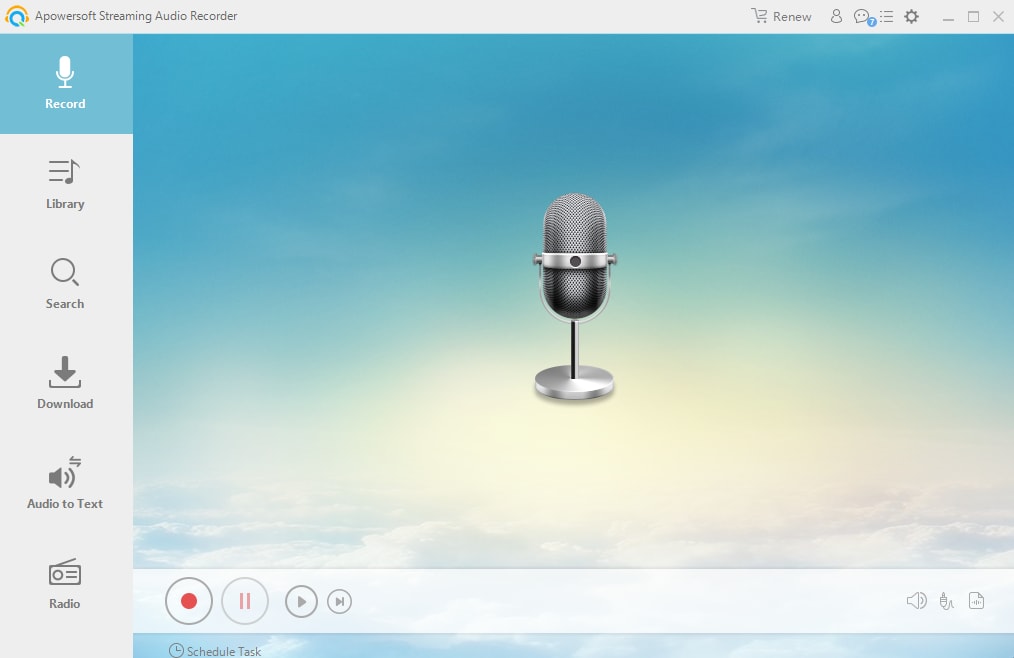
Once the Launcher is installed and displayed on your screen, visit YouTube, play the song you want to record, and go back to the launcher, then choose the system sound as the source sound and click the "Record button" at the middle.
STEP3
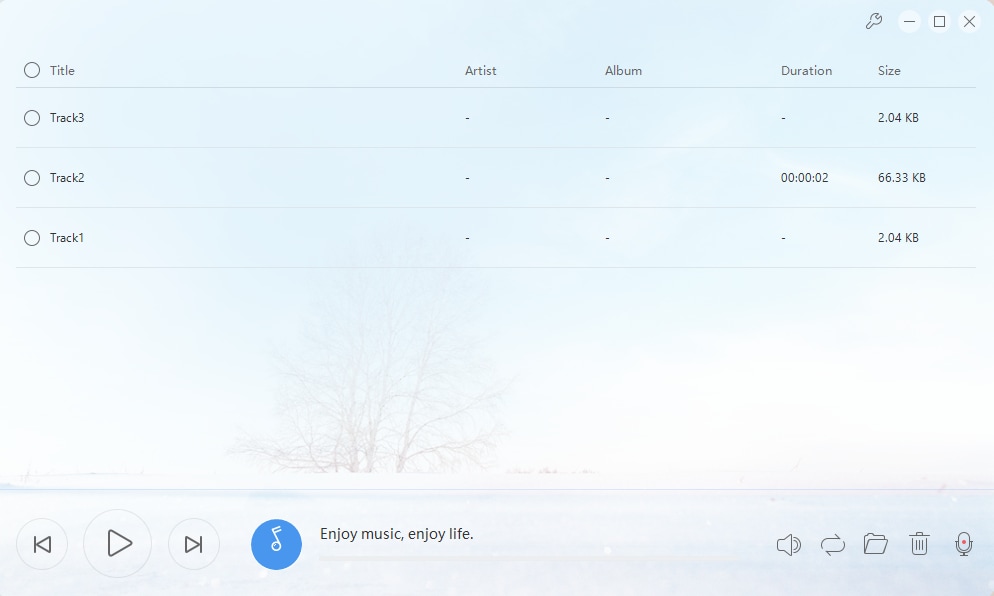
Once you're done recording, click on the "Stop Button" and the audio file will be automatically saved to the recording list.
VLC
VLC is widely known to be a media player that permits PC and smartphone users to play media files of different formats. Beyond every reasonable doubt, the VLC media player is rated among the best media-playing software due to its efficiency and vitality. But who'd ever say that the media player could function as a youtube to mp3 converter for Mac, Windows, and other OS. Discover the unknown secrets in the steps below.
STEP1
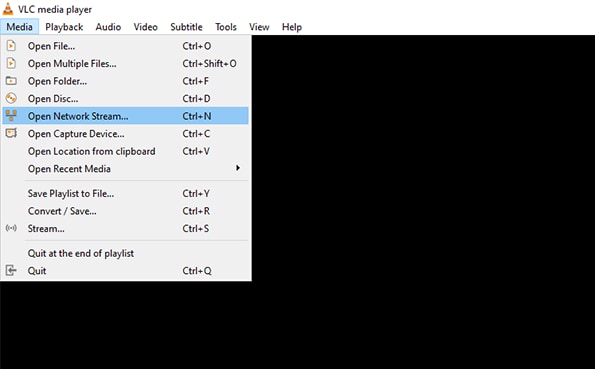
Download and install the VLC media player > go to YouTube and copy the link address of song > Launch the VLC > click on "Media" from the menu bar at the top of the interface > choose select "Open Network Stream" from the displayed menu > paste the copied link to the "Open Media" box
STEP2
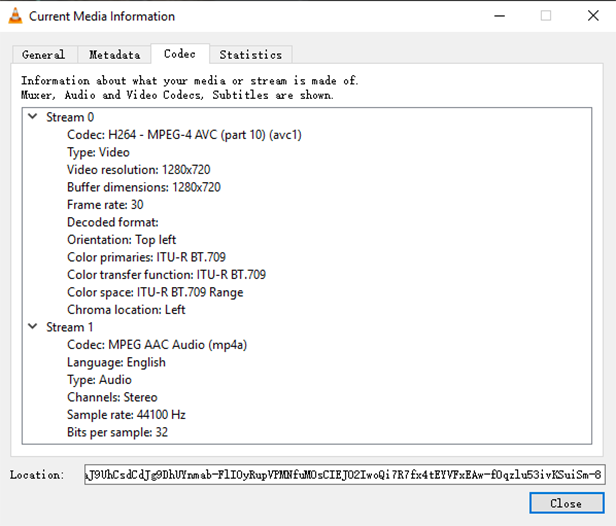
Now, right-click on the VLC screen > select "Tools" from the appeared menu > select "Codec Information" from the sub-menu > from the newly appeared window, copy the address inside the location box > open a webpage (new tab) on your browser, and paste the address.
STEP3
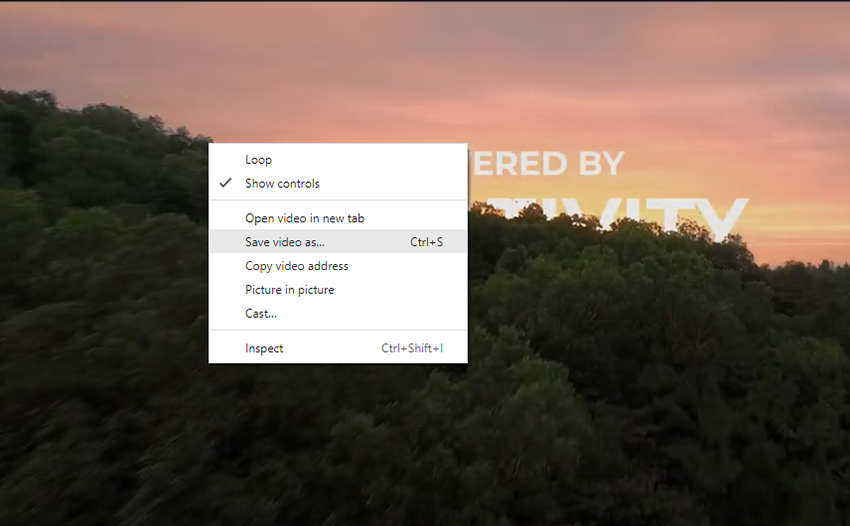
Now, right-click on the video on the webpage > select "Save video as"> rename the video and save it.
Now, to convert the YouTube video to MP3, you'll have to follow these steps.
STEP1
Open the VLC Media player > click on "Media" from the menu bar > select "Convert/Save" from the menu > click on "Add" from the Open media dialog > import the previously downloaded YouTube video by selecting it and clicking on "Open" below the window > click the "Convert/Save" button on the open media dialog.
STEP2
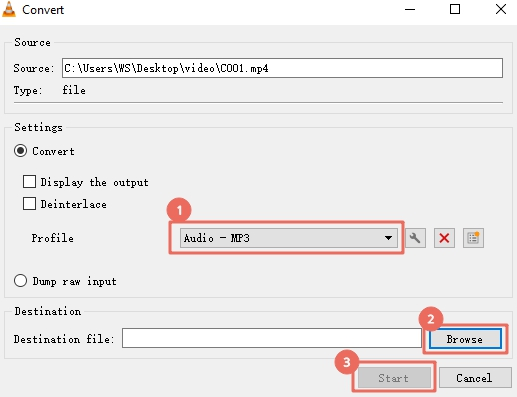
From the newly appeared window, select the "Profile" dropdown option and select "Audio-MP3"> If you'd like to adjust bit rate, sample rate, and more, just click the "Create a new profile" button at the right end of the profile dropdown option.
STEP3
Now, click on the "Browse" button below > select a location to save the file > rename it > click "Save" and finally, click "Start" to begin the conversion. Once it's done, you can access it from the location you saved it.
Part 4. Q&As about Converting YouTube to MP3
1. Is converting YouTube to MP3 illegal?
Only your motive can decide if it's illegal or not. If you're converting YouTube to Mp3 for self-entertainment, it's not completely unlawful since nobody would get to know, but if it's for piracy, then it's illegal because you're stealing other people's content as yours, and this Is tagged as infringement.
2. Are Online MP3 Converters Safe?
No, they are not completely safe. This is because you, as a user using an online mp3 converter, can open your device to bugs and viruses, bridge of privacy will it might result in stealing of personal data and information.
For Win 7 or later (64-bit)
For macOS 10.12 or later