


An iTunes gift card is a great present for anyone who loves listening to music or for those who enjoy the latest movies or books. Of course, you need to have iTunes accounts in order to use the gift card. Once you redeem the card, you will be able to download from a wide variety of media choices. You can get movies and videos, the latest songs and albums, TV show episodes, e-books, or even fantastic applications and programs.
Via iTunes
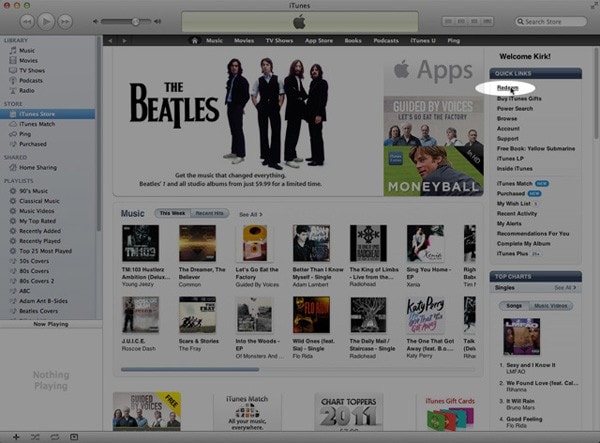
- Go to iTunes and log in your iTunes account, then click "Redeem" on the right column.
- Now you can redeem the card by following the simple redemption instructions at the back of the card. Just scratch the coating to reveal the card code, and input the code to the "Redeem" section.
- Last, click the "Redeem".
You will then see how much credit on your iTunes account with which you can download a variety of digital media. Every time you purchase a song or a video, iTunes automatically deducts it from your credit. If your pending purchases are to exceed the credit amount available on your account, iTunes will ask you to input your card number. You will then need to provide the extra payment through your credit card.
Via iTunes app on your iPhone, iPad or iPod
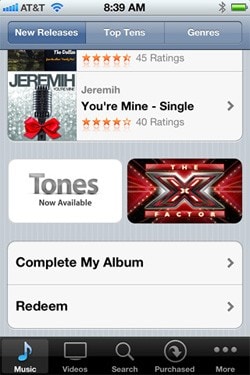
- Tap "iTunes" option on your device, and log in your iTunes account.
- Tap on "Videos" or "Music" at the bottom.
- Tap on "Redeem" option.
- Input the gift card code.
Via App Store
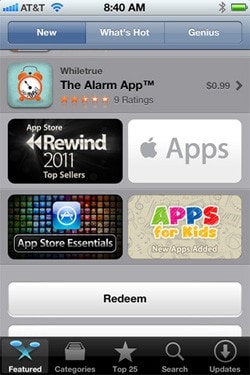
- Go to App Store, and log in your account.
- Tap on "Featured" option at the bottom.
- Input the card code.
Via Books
If you have got "Books" app installed on your iPhone, iPod or iPad, you are able to purchase your favorite books by using the gift card.
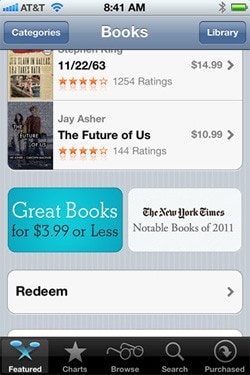
- Go to "Books" and open "Store".
- Tap on "Featured" option.
- Scroll down to the bottom and tap on "Redeem".
- Enter the card code.
Note that some iTunes gift cards, particularly those that are available outside of the US, may have certain limitations. Some gift cards can only be used to purchase audio files, while others are only for videos or movies. If you are unsure about this, make sure to check your card properly so that you do not run into any problem.
Have fun!