/ Posted by to
by Brian Fisher • • Proven solutions
Let's face it, Windows and Mac will never fully get along. Playing WMV (Windows Media Video) in QuickTime on Mac is no execption. So if you're looking to play WMV on Mac with QuickTime, this article will show you the most trusted solutions to play WMV video on Mac (macOS Lion, Mountain Lion, Mavericks, Yosemite, El Capitan, Sierra, High Sierra and newly Mojave included), and also help you to edit WMV in iMovie, add WMV to iTunes and more.
- Part 1. How to Play WMV on Mac (Easily!)
- Part 2. Install Flip4Mac Component for QuickTime to Play WMV for Mac
- Part 3. Install Windows Media Player for Mac to Play WMV File
- Part 4. Recommend 5 WMV Player for Mac
Part 1. How to Play WMV on Mac Easily
Mac won't play WMV directly. So if you want to play WMV on Mac, you need to convert WMV to QuickTime compatible format first. So how to convert WMV to MOV or MP4 that can play on Mac? UniConverter will definitely help you do that! This is an all-in-one video tool to convert and play WMV on macOS 10.7 or later (10.14 Mojave, 10.13 High Sierra & 10.12 Sierra included) with ease.
Get the Best WMV to QuickTime Video Converter
- 3 simple steps to convert WMV video to Mac supported format like MOV, MP4 at 90X faster speed.
- Support to convert WMV to 150+ formats, including MP4, AVI, FLV, M4V, MKV, DV, VOB, MPEG-2, 3GP, etc.
- 90X faster speed conversion without losing video quality.
- Easily tranfer your converted WMV video to your mobile devices like iPhone, iPad, iPod, Android, etc.
- Edit your WMV videos with built-in video editing tools, like Trim, Crop, Rotate, Add Effects, Subtitles, etc.
- Download online video from YouTube, Vimeo, Vevo, Facebook, Hulu, Dailymotion, and 1,000 more popular sites.
- Offer a series of useful handy tools like GIF maker, VR covnerter, cast to TV, DVD copy, screen recorder, etc.
[Video Tutorial] How to Play WMV Video without Converting on Mac
[Step-by-step] How to Convert WMV to Quicktime Supported Format for Playback on Mac
Before converting WMV videos to QuickTime supported format, you should know that UniConverter can play WMV on Mac without any limitation. But if you want to play WMV with QuickTime, please follow this tutorial to convert to the QuickTime supported format first.
Step 1: Download the Program
At first, you need to download and install UniConverter on your computer, then find it from the Application folder and click to launch the program.
Step 2: Add WMV Files
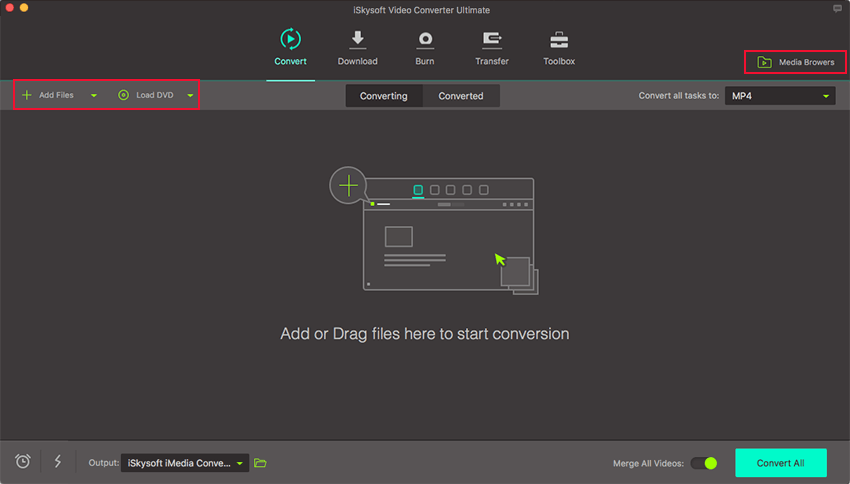
After launching the program, your can directly drag and drop the WMV file into the program, or just click the "+Add Files" option at the top left corner of the program main interface to choose the WMV file and add to the program. Alternatively, you can import from your mobile devices by clicking the drop-down icon beside.
Step 3: Set the Output Format (MOV or MP4 on Mac)
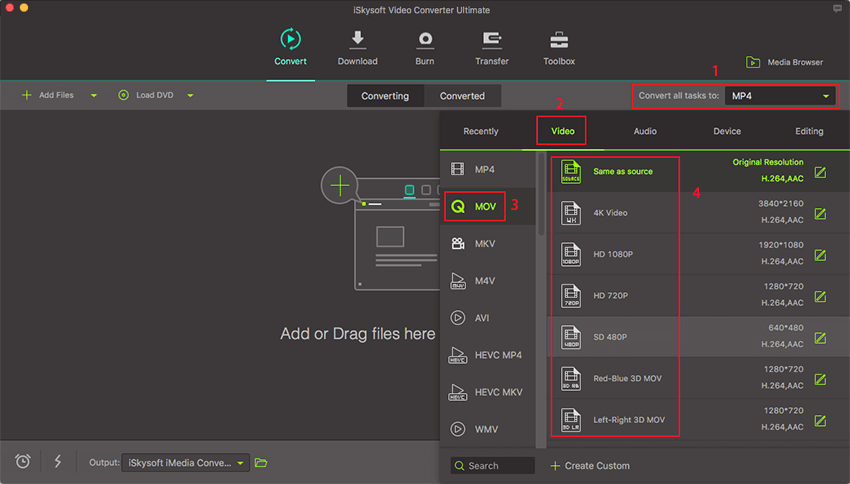
In the format tray, there are some output video format options and optimized presets provided for QuickTime, iPhone, iPad, iPod, iMovie and more. To play WMV files on Mac, you can just choose "MOV" as output format from Video tab.
Step 4: Start to Convert WMV to MOV in order to play WMV files on Mac
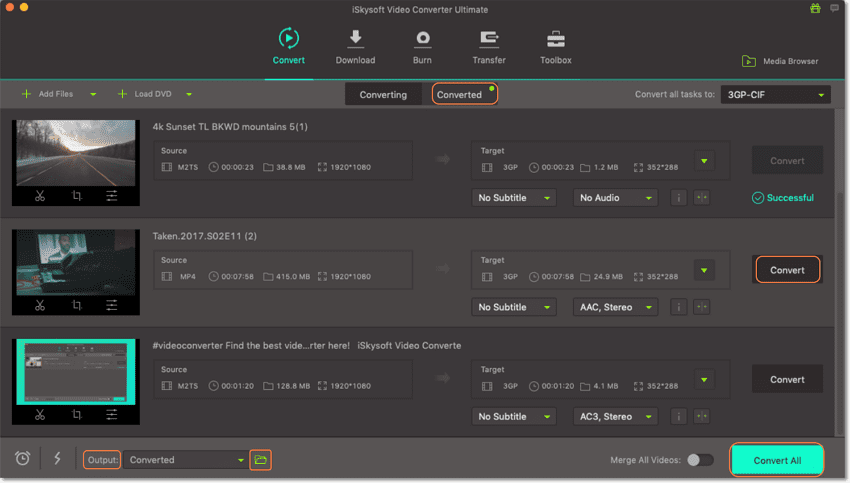
When you have selected the output format, you can click the "Convert" button in the display bar or "Convert All" button at bottom right if you have more than 1 video to be converted to start the conversion (It supports batch conversion).
Note: Under the help of UniConverter for Mac, you can play WMV in QuickTime successfully in 1 minute. For Windows users, please download the Windows version and do steps in the same way. If you want to try other ways, please read on, but this solution is highly recommended. By the way, if you want to get more free WMV players, please check this link.
Part 2. Install Flip4Mac component for QuickTime to Play WMV for Mac
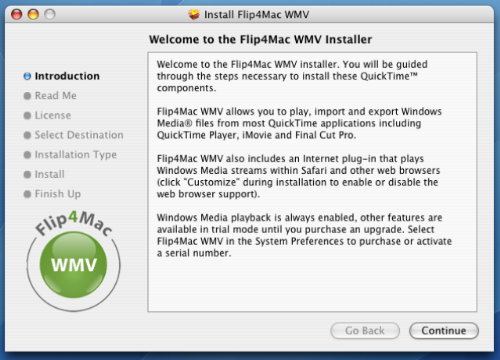
Flip4Mac is also known as Windows Media Components for QuickTime, it is and add-on for Apple’s multimedia player that allows you to play WMV and WMA files on QuickTime easily, apart for supporting WMV files with QuickTime player, Flip4Mac can also be used to play contents from the internet from a Web browser. You can also use MMM Real-Time Streaming protocol, HTTP,MMS HTTP, as well as FTP network protocols with Flip4Mac. It also supports several audio codecs, with this plug-in, you can get support for MP3, WMV9 and many other Microsoft audio codecs. While the free version is limited, the pro version has several extended functionalities that are very useful.
Install Flip4Mac is very easy, all you need is to follow these steps:
Step 1: Download the Flip4Mac plug-in.
Step 2: Run and install the plugin on your mac and your Flip4Mac is ready for use. The plug-in is automatically attached to QuickTime after installing so you will not notice it. WMV files are directly played through QuickTime all you have to do is double click the WMV file.
Part 3. Install Windows Media Player for Mac to Play WMV Files
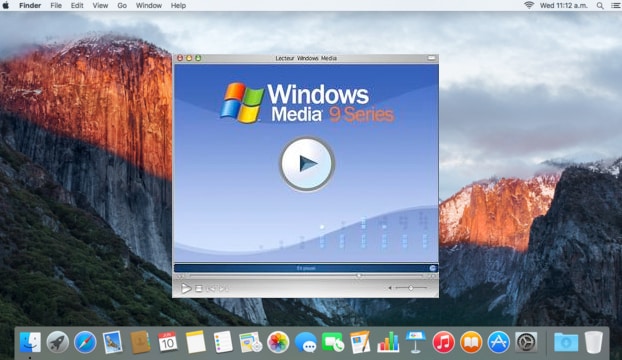
It is now easier to play WMV file on Mac using Windows Media player itself, this has been made possible with the new Windows player 9 for mas. This player can play both streamed and local WMA and WMV files on a Mac at no cost at all. Installing Windows Media Player is also easy with these steps:
Step 1:Download and install Windows media player for Mac.
Step 2: To watch a WMV file, just launch the media player on your Mac and select the WMV “File”, “Open” to choose the WMV file and click “OK” to load the movie. To play the video, click on the “Play” button and the base of the screen and you can happily watch your WMV video file.
Part 4. Recommend 3 WMV Player for Mac
- How do I open a WMV files on Mac?
Apart from the above mentioned method of playing WMV files on Mac, there are also other WMV player you can use to view and playback your WMV files on Mac. These players are third party WMV players for Mac and are easy to use as well. These players are numerous and easily available, however, to save you from unnecessary complaints, there are excellent players that will play your WMV files without hitch. Here they are:
#1. MPlayerX
This player is an open and free source that can play any file format. It is one of the most popularly used WMV players on Mac, it also has the capacity to output audio files in waw format. This player started as a Google Codes projects in the bid to create a multipurpose player. MPlayerX is designed specifically for Mac and is one of the best WMVplayers.
Pros:
- Excellent online support.
- Smooth playback experience.
- Plays all video formats using the best codes.
- Does not require additional plug-in to run.
Cons:
- Only advanced users can enjoy using the player.

#2. VLC Media Player
- Can you play WMV on a Mac? Sure! VLC supports several video and audio file formats as well as Video CD, streaming Protocols and DVD-Video. With VLC you can stream a video over your Mac with internet connection and transcode multimedia files VLC is a well-known WMV player, it is compatible with Mac and Windows as well as Linux OS. It allows you to play you WMV file on Mac without Flip4Mcac. It does not require any codec, you only need to simply open the WMV file. You can also VLC to play other multimedia files such as MPEG, MKV and others.
Pros:
- Can cater for any type multimedia file.
- Supports multiple codecs such as MKV, WebM, WMV and MP3.
- It is a lightweight media player as it requires little processor or memory power.
- It is compatible with Linux, Mac and Windows operating system.
Cons:
- Cannot play a selected few file formats.
- Some versions of Indeo Video codec is not supported.

#3. DIVX
DIVX is a desktop media player as well as a video converter. It is also known for its ability to compress lengthy video segments into smaller sizes with high video quality. It has a wonderful playback experience, with this player, you can play videos in several formats on your Mac such as WMV, AVI, MP4 and MKV.
Pros:
- Wonderful video playback experience.
- Supports numerous video file formats.
- High quality web video clips, movies and TV shows.
Cons:
- Complex to use especially for newbies.
- Takes large memory space.
- Its take a long while to install.
Tips: FAQs About Watching WMV on Mac
#1. Why can't VLC play WMV on Mac?
A: Although VLC includes all common codecs for video files, sometime it will also fail to play some WMV videos. In such cases, first make sure you're using the latest VLC. Secondly, make sure the WMV files are not corrupted. To do so, either try other media player software or try importing WMV to UniConverter for Mac.
#2. Can all computers play .wmv files?
A: Of course NOT. WMV is encoded with Windows Media Video format so you need a media player with WMV decoder included, or your system provides such a decoder. If you're using Windows, you can usually play WMV files without any problem, but if you want to watch WMV video on Mac, you have to install a WMV player or convert WMV to MOV or other Mac-compatible formats first.
#3. How do you play WMV files on MacBook Pro?
A: The solution for playing on MacBook Pro is the same as that on Mac because MacBook Pro is running Mac OS X. That is to say, you can download a WMV player like VLC or convert WMV to MOV so you can play WMV on Mac, MacBook Pro, iPhone, iPad, iPod, Apple TV, etc.
4. Media formats supported by QuickTime Player
Supported Video Format: QuickTime Movie (.mov), MPEG-4 (.mp4, .m4v), MPEG-2 (OS X Lion or later), MPEG-1, 3GPP, 3GPP2, AVCHD (OS X Mountain Lion or later), AVI (Motion JPEG only), DV.
Supported Audio Format: iTunes Audio (.m4a, .m4b, .m4p), MP3, Core Audio (.caf), AIFF, AU, SD2, WAV, SND, AMR.
Brian Fisher
staff Editor