/ Posted by to
by Brian Fisher • • Proven solutions
If you are using a Mac, you may be frustrated when come across many kinds of semi-compatible video formats like FLV, MKV and AVI that makes enjoying movies a daily challenge. QuickTime, for example, only supports limited video formats like MPEG-4 and . The problem is that there are still many video files which are encoded in XviD and DivX. Maybe you also have some old WMV-encoded files you'd like to playback. So, you may have some videos need to play in QuickTime, such as AVI format, while others require FLV Player or mPlayer or VideoLan Client. You can adopt a way to re-encode all your video files to to play them in QuickTime by adopting a professional video converting software.
- Part 1. Tutorial on Using Perian for Quicktime to Play Videos of Various Formats on Mac
- Part 2. Best QuickTime Alternative to Play Any Video on Mac
Part 1. Tutorial on Using Perian for Quicktime to Play Videos of Various Formats on Mac
Perian can be recognized as the Swiss-army knife of QuickTime, or saying as add-in of QuickTime. It enables QuickTime to play many popular video formats that not supported by QuickTime natively, like WebM/VP8, MKV. Perian codec is open-source and you can download Perain here.

Note: The QuickTime components only enable you to play these videos via QuickTime on your Mac or PC, and if you would like to play common formats like AVI, WMV, FLV on iPod, iPad, iPhone or edit them with iMovie etc, you'll have to adopt UniConverter to convert the videos.
Guide to Install and Run Perian for QuickTime on Mac
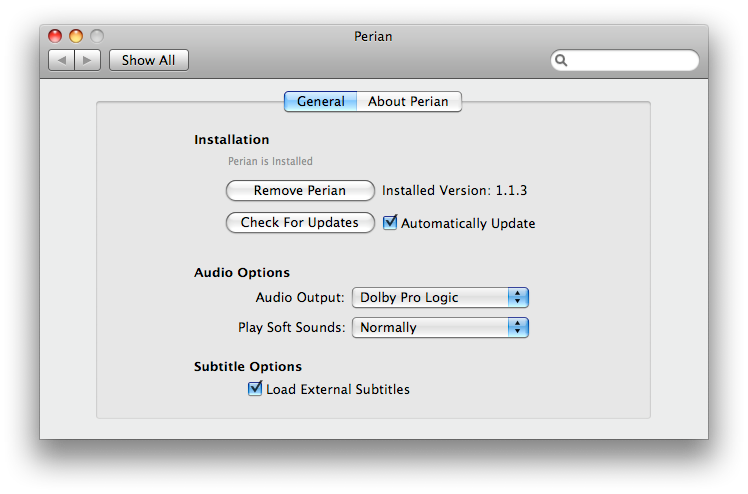
Step 1. Open Perian
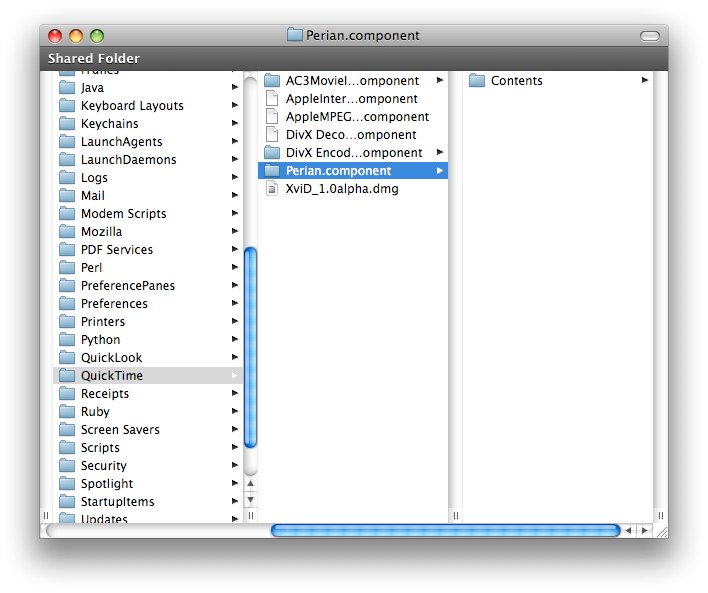
After downloading the Package of Perian for QuickTime, open the disk image, double click Perian.prefPane icon. It will automatically install and update all its components. Drag and drop the QuickTime components to the Library -> QuickTime folder you selected: your user's Library (which is only for you) or the top-level Library (which is for everyone on Mac).
Step 2. Run QuickTime
After done, restart all programs that run QuickTime(iTunes, QuickTime Player, your browser, etc.), then you are done.
Note: You are able to drag and drop the QuickTime components to the Library -> QuickTime folder you selected: your user's Library which is only for you or the top-level Library which is for everyone on Mac.
You'll find that QuickTime now can magically support more diverse video formats: AVI, DivX, DivX 3.11 alpha, XviD, MS-MPEG4 v3, 3ivX, MS-MPEG4 v2, MS-MPEG4 v1, Truemotion VP6, Sorenson H.263, FLV and formats that an AVI file contains--AC3, AAC Audio, VBR MP3, mpeg4, and h.264.
Perian for QuickTime is a good add-in for QuickTime. But it is not the perfect one for good quality, since it provides somewhat sub-par quality when compared with the method of directly getting the codes from the source. Thus, Perian for QuickTime can be nice and convenient but not suitable for quality lover.(Please note that if you have got Perian installed on your Mac and now want to quit it, you have to delete the Perian. component file by navigating to the /Library/QuickTime. Otherwise, it will screw up the replacement codecs.)
Part 2. Best QuickTime Alternative to Play Any Video on Mac
In addition to QuickTime, UniConverter is another popular video player for Mac users. In fact, UniConverter is a powerful video converting tool, which supports to import videos of 150+ different formats. And it allows you to play any video on Mac as well. And if you want to play AVI videos with QuickTime or play WMV videos on Mac, please check the links to learn more.
Get the Best QuickTime Alternative:
- Easily play any video on Mac. It supports over 150 video & audio formats, including MOV, MP4, M4V, FLV, AVI, MPG, 3GP, MP3, M4A, WAV, WMA, AIFF, etc.
- Freely convert video or audio files between any two common formats.
- Edit your videos with built-in video editor. It can crop, trim, add subtitles/watermarks/effects to your videos.
- Burn videos to DVD whenever you want.
- It can work as a video downloader to help download online videos from YouTube, Facebook, Vevo, Vimeo, Dailymotion, Metacafe, Hulu, etc.
- Compatible with macOS 10.15 Catalina, 10.14 Mojave, 10.13 High Sierra, 10.12 Sierra, 10.11 El Capitan, 10.10 Yosemite, 10.9 Mavericks, 10.8 Mountain Lion and 10.7 Lion.
How to Play Videos on Mac using UniConverter
Step 1. Load your videos
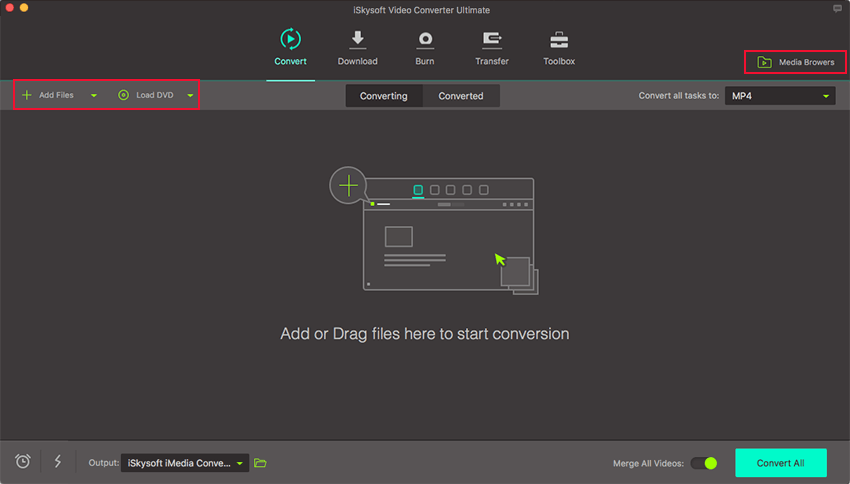
To import your videos, please open the program and click "Add Files" on the main interface. Alternatively you can directly drag and drop videos to the program in a batch. Then you can click on the video thumbnail to play it.
Step 2. Select your output format
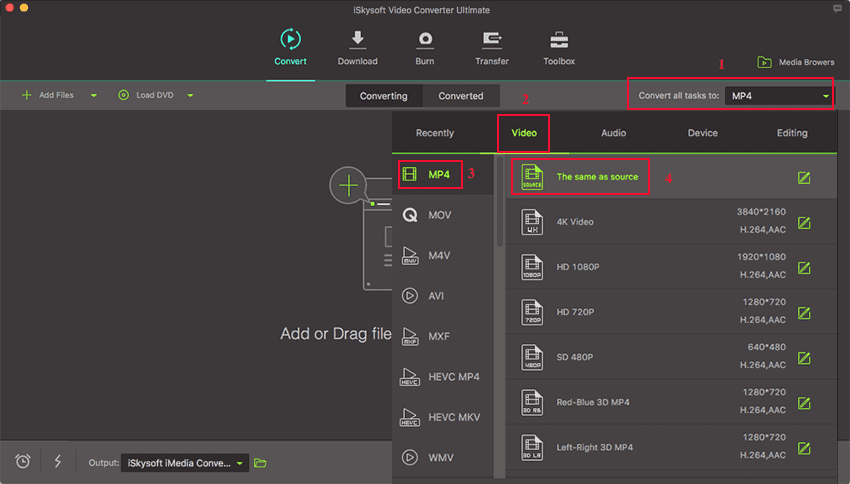
And if you want to play your videos on other players, you can convert them to the compatible formats. Now with UniConverter, please firstly select the output format as needed.
Step 3. Convert and play videos
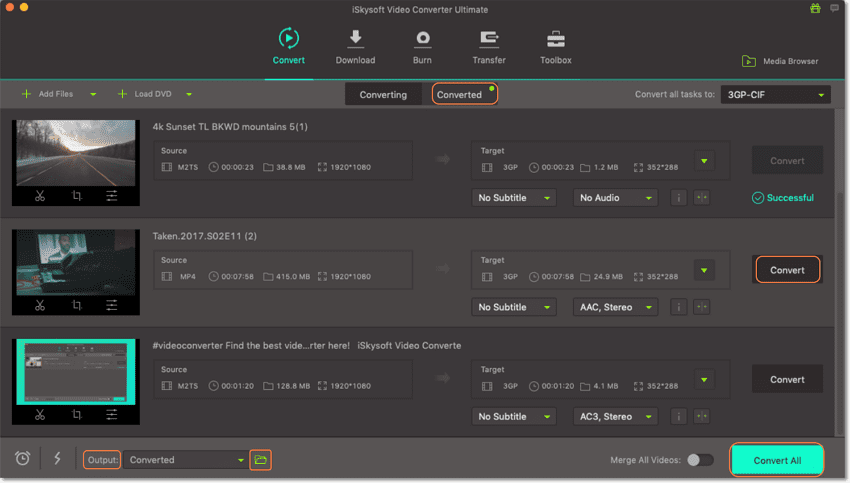
After selecting the output location, just hit the "Convert All" button to convert your videos for playback on any player as you like.
Brian Fisher
staff Editor