
UniConverter - Easy to Edit Movie Subtitles
Use uniconverter to convert/download/compress 1000+ video/audio formats, it's 90X faster.
In this article
Subtitles are mostly used in TV programs and films. They originate from screenplays or transcripts with the sole aim of helping deaf persons understand what is going on in a scene. Most of the formats supported by subtitles are text-based and are denoted by the extension .txt. From this article, you will be able to learn more about subtitles download.
Part 1. Top 25 Sites to Download Subtitles
Where can I download subtitles? You may search for subtitle download sites but find nothing! Don't worry! From the following content, you will find 25 top reputable sites to download movie subtitles. Just pick out the best one for yourself.
Moviesubtitles
Moviesubtitles has the biggest advantage of offering many languages for movie subtitles. If you want the latest one in the market, the search options allow for that as well as those that have been downloaded many times.
Download Subtitles
This site has subtitles arranged in an orderly manner. There are those from 0-9 in the numerical order while others are arranged alphabetically from A-Z. You will have the freedom to choose the one that suits your movies.
DivXSubtitles
It is well detailed with crucial information on all the latest movie subtitles in the market. There is the date of release, the title of the movie, the language used and its uploader. That makes it easy for you to choose the best subtitles to download.
OpenSubtitles
There are thousands of movie subtitles that you will come across at Opensubtitles.org/en. Language is the most effective option for making searches and downloading is done directly. It is also possible to upload fresh movie subtitles using this site.
All 4 DIVX
All 4 DIVX does not link directly to subtitle files, it provides links to other independent web pages that host subtitles files. This is a perfect subtitles download site, worth to have a free trying.
SubsMax
At SubsMax, there are over one million subtitles that you can use for thousands of movies. You just need to make searches using the right language and names to end up with the most suited one for your use. This site allows for uploading of new subtitles.
Subs4free.com
This is a more limited site form where you can download subtitles for movies and TV series. They have only two languages; Greek and English with the common format being DVDrip.
Addic7ed.com
This is one of the popular sites where TV shows and movie subtitles can be downloaded for free and in a stress-free manner. They always have the most popular links and other relevant links to use in downloading suitable subtitles.
SubtitleSource
This site supports three main formats namely XviD, DivX and x264. They are all well suited for TV series and movies so make sure your searches are precise about quality and language.
iSubtitles.in
iSubtitles.in is a famous subtitles website that favors different speakers. It supports over 30 languages. Therefore, after searching for the movie subtitle, you can filter languages and download the subtitle in the preferred language. This website has labeled the movie subtitles according to movie genre, language, date released and location of the movie.
DownSub
You can also check on the Downsub website. This website acts as a subtitle downloader that supports download of subtitles from third-party sites like YouTube, Viu, Viki, Vlive and Kcon among others. Here you have to paste the URL link and download the movie subtitles.
Yiffy Subtitles
Another website that you can visit and download your subtitles is Yiffy subtitles. This website supports subtitles in different languages like English, Arabic, Farsi/Persian, Portuguese, Spanish and French. Although the website has ads, you can still locate the search button and find the desired subtitle.
English-Subtitles.org
This website is ideal for English speakers since the subtitles found here are in the English language only. English-Subtitles.org website has subtitles for movies and TV shows. It is to use since clicking on the download button can download the files.
Lil Subs Subtitle Downloader
Lil Subs Subtitle is a website that allows you to download subtitles from third party sources. On this site you just have to paste the URL of the movie that you want to get its subtitles and this site will help you get them.
SRTSubtitle
You can also check on English movie subtitles on SRTSubtitle. The list of subtitles is categorized according to new movie subtitles, top 10 English movie subtitles and high 10 English TV series. You can also search the movies on the search button if you don’t find them in the default category.
TVsubtitles.net
Another website that you can find movie subtitles is TVSubtitles.net. Besides you can also get TV shows on this website. In total, it has 317,216 movie subtitles in over 24 languages. Moreover, the subtitles on the website are organized according to the latest release, most downloaded and top TV shows. Therefore, if the movie you are looking for is placed in any of this category you can easily find its subtitle otherwise you have to search for it.
Open Subtitles
Open Subtitles is another subtitle site that you can get up to 820,000 subtitles. You can search for subtitles or head to the most downloaded category, latest subtitles or requested subtitles and browse for the desired subtitle. Although the website is a bit junky with many ads pops up you can still get movie subtitles.
TVsubs.net
If you are looking for subtitles for TV shows, and movies then you can also check on TVsubs.net. The website has 218228 subtitles with over 3million downloads thus it is a credible trusted site. You can also find subtitles in different languages.
Sur.ly
You can also get subtitles on Subtitles HR. The subtitles are named and listed alphabetically to make your downloads very easy. You can also search for the subtitles on the search button. Another thing about Subtitles HR is that the platform is multilingual.
BollyNook
BollyNook is not just a colorful website when you land on it, but it comes in handy when you are looking for Bollywood movie subtitles. It has an extensive database of Bollywood movie subtitles as well as Bollywood song lyrics. The website is user-friendly, and it has a search button which output results quickly.
Popcorn Subtitles
Popcorn subtitles is a user-friendly website that is eye-catching to any user. When you visit the website, you will see a list of subtitles on it. Subtitles download is free and is available in a different language. When you click on a specific subtitle heading, you will be able to see the supported languages. Select the language you prefer and download it.
Podnapisi.net
You can also visit Podnapisi.net and download movie subtitles. On the website, you will get a list of new subtitles, most downloaded subtitles, most commented subtitles and most rated subtitles. This free analytics helps you pick on the best subtitles for your movies. According to the website, the boast of hosting 2,009,914 subtitles at the time we wrote this article.
Subsynchro.com
Despite having content written in the small strenuous font, you will still find subtitles for different movies. You will get the subtitles of the recently released movies on this website as well as old movies. This website is interactive as it allows users to rate the subtitles. Therefore you can check the subtitles reviews and get yourself the best movie subtitle.
Ondertitel.com
Although this is a Dutch website, you can still find some movie subtitles. You can search the subtitles using the movie title or click on the subtitle categories. Subtitles are categorized according to Top 100 subtitles, top 100 series subtitles, latest subtitles and recent subtitles. Once you have found the subtitle, you can then download it in the language that you want. The download speed of this website is relatively reasonable compared to other websites.
Part 2. How to Add Subtitles to Videos/Movies using iSkysoft Video Converter
Subtitles are great especially when the video is played in a language that you do not understand. If you are French and want to share videos with people who only understand English, you will have to add subtitles to video. With UniConverter you can do this with a lot of ease. It comes with a handy editor that simplifies the process of adding subtitles. All you have to do is add them at the designated place or upload the subtitle file, and then convert the video into one that has the subtitles.
Wondershare UniConverter - Best Video Converter for Mac/Windows
5,481,435 people have downloaded it.
Edit your video – you can use the inbuilt video editor to add more to your videos, including the subtitles, watermark, effects or trim and crop video.
Works with over 150 audio and video formats – this is a versatile tool that you can use to convert a wide range of video and audio formats.
Very fast tool – the conversion process is done at 90X; the fastest conversion speed in the industry with losing video quality.
Convert online video – this program allows you to convert or record streaming videos from 1,000+ popular sites, including YouTube, Facebook, VEVO, Hulu, Metacafe, etc.
Burn to DVD and more – you can use this tool to burn your videos to DVD, even after adding the subtitles. You can also share on Internet sites. Finally, you can simply send it to your mobile device or computer.
[Step-by-step Guide] How to Add Subtitles to Videos with iSkysoft
Step 1. Load videos
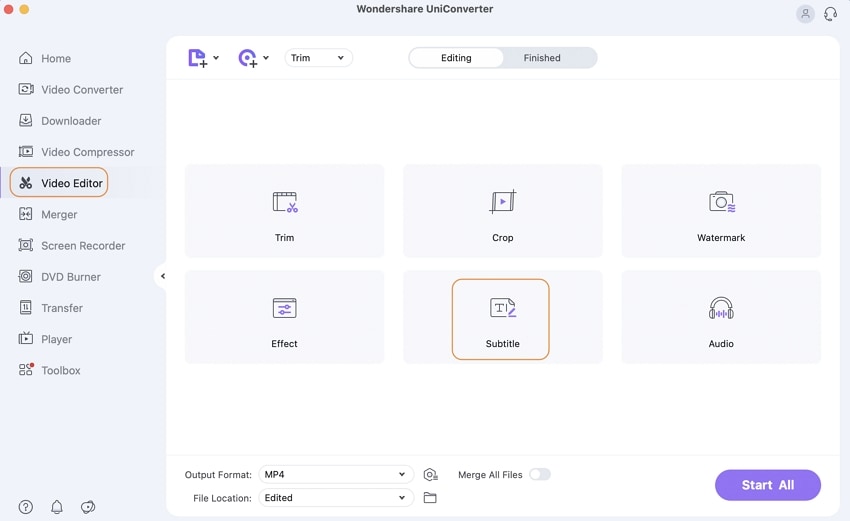
To import your videos to the program, please go to the "Video Editor" menu and then choose "Subtitle" icon . Alternatively, you can drag and drop the media into the converter.
Step 2. Add subtitles to your video
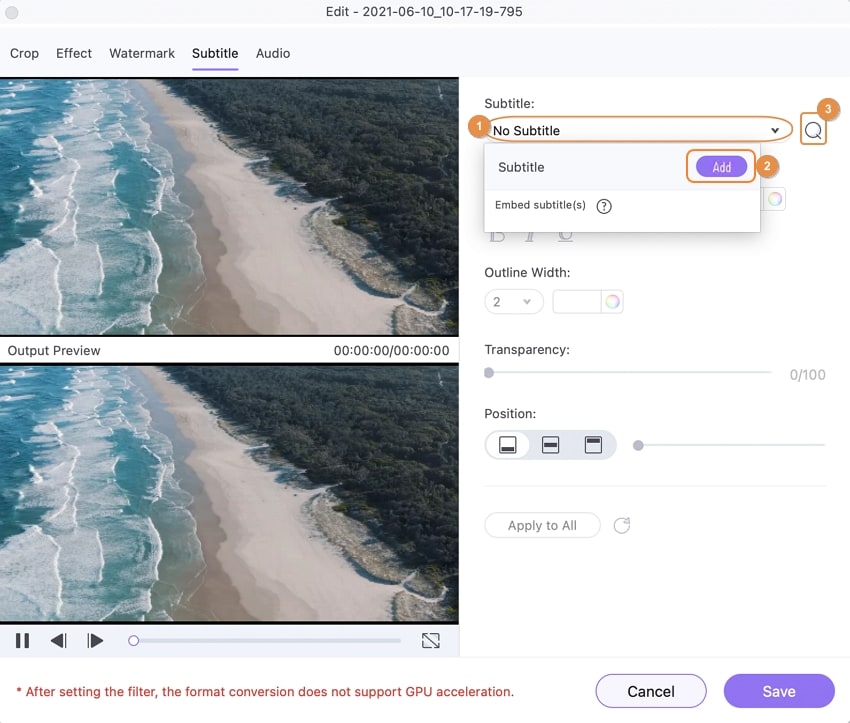
A new window will pop up. On the new window that appears click on the Subtitle tab. Click on “Add” icon and load the .ssa, .srt, or .ass subtitle file. You can also use the built-in search tool to find the subtitle you want. You can then adjust font, font size, font color, font style and transparency, outline width, opacity, position and so on. Play the output preview and see how it will appear.
Step 3. Select your output format
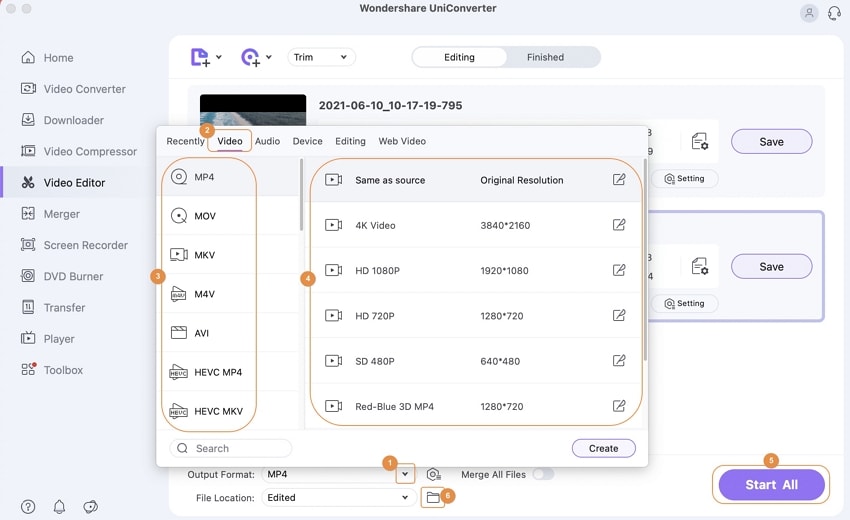
Go to the output format tray and select the format that you want your video sent in.
Step 4. Convert the video
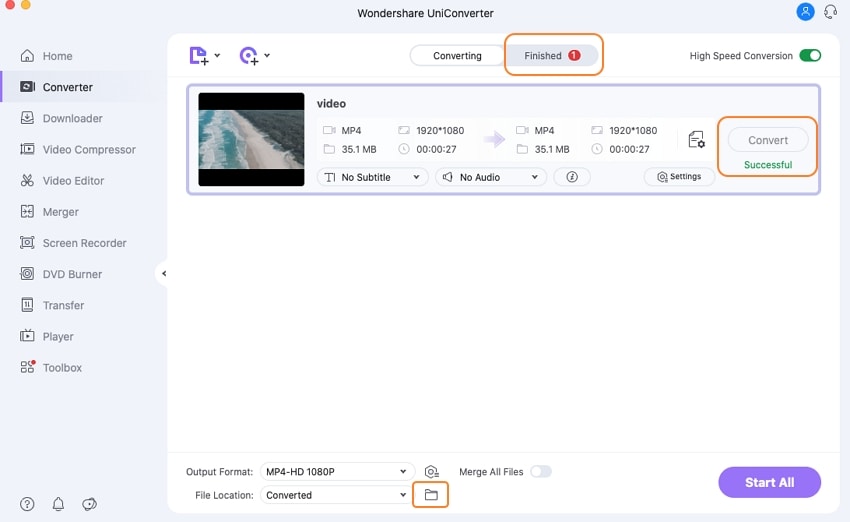
Click on the “Convert” button to start converting the video with subtitles. You will get the converted video with subtitles in the original format or other formats you set. That's it! This is quite simple for adding subtitles to video. You can free download it and have a try on your own Mac or Windows PC!
Tips About Downloading Subtitles
Do not expect the process of downloading subtitles to be easy. However, you can make it easy if you have the right tips and tricks. First and foremost, be sure to set all the options and settings right for the downloading process to be easy. This is actually the first step and should be given top consideration. The right and fully compatible playback and output formats have to be selected. Never start the downloading procedures before the window displaying subtitle database pops up.
The window will make it easy to select the subtitles that you want to download. Without it showing up, you will have difficulties making the right selection of subtitles so be patient enough. The subtitle should be named in a similar way as the video file and this is all to do with compatibility. There are options for downloading movie subtitles with the automatic procedures or manual procedures. It will be upon you to choose which among the two options your favorite is. There are times when the downloaded video subtitles fail to play. That can point out some irregularities in the downloading process and the only solution is starting afresh.
Part 3. Other Software Recommendations for Adding Subtitles to Movies
Other tools to create, edit, convert, add subtitle and to sync and adjust subtitle
Subtitle Workshop
This software program is good for editing subtitles. It is well-organized, convenient and supportive of different formats for subtitles. It is available for free downloading with additional abilities to convert text as well. It is user-friendly and has many customizable features to make it the best. People use it to add subtitles to video.
It is a subtitle editor and deals with subtitles based on text. If you have new subtitles to create then Jubler will be good for authoring that together with converting, correcting and refining already existing subtitles. To use Jubler, you will be required to have a spell checking tool to ensure the subtitles are grammatically correct, a player for viewing the subtitles and JREs latest version.
This software is good as a subtitle creator which is its main specialty. It is good when the subtitles to be created are for DVDs. Its interface is well advanced as well as harmonization features that make the software stand out easily from the rest. The outstanding feature for this subtitle creator is the WYSIWYG editor which allows one to preview DVDs. Subtitle Workshop is the perfect example of a subtitle creator.
This software program will be very effective when it comes to editing subtitles. It handles tasks like removal of the subtitles, translation, adding subtitles and re-syncing where necessary. Open Subtitle Editor can as well create new subtitles right from nothing.
SubMagic
This is a software program that can multitask with ease. You can have it for editing subtitles, conversion of formats, translation from one language to another and creation of new subtitles. Very many formats are supported by SubMagic while its functions and features come in numbers just to make the user experience memorable.
This is a subtitle editor that you can be happy to use. Some of the editing functions it can perform include making corrections, transforming content and refining the already existing subtitle. Its biggest advantage is the ability to show sound waves that will come in handy when matching subtitles with voices. VisualSubSync supports three formats; SRT, ASS and SSA.
This will be your suitable option anytime you want to create new subtitles, make some editing and convert for compatibility purposes. It comes in many languages that make out the best user experience all the time. DivXLand Media Subtitler supports formats like WMV, AVI, MPG and many other video compatible files. Its notable features are modes for bulk subtitling, instant previews, pause editing, rapid start guide and basic text configuring support.
VirtualDub MSU Subtitle Remover
This software program is intended to get rid of subtitles from videos during replay. You will be lucky to use this program because it is professional enough to ensure the quality of your video is not watered down. To those people who don't like watching movies with integrated subtitles, VirtualDub MSU Subtitle Remover will be the right solution to getting the subtitles out. However, there will be a few steps to undertake before successfully running this program manually. Make sure the steps are followed strictly, and you will have the best time removing subtitles with VirtualDub MSU Subtitle Remover.
This software will be good for extracting subtitles and its unique features say it all. It has a command-line support, its compatible with vista/7; it has a language display option, chapter extraction, an indicator for progress and command display among other features. The main formats it supports are WEBM and MKV.
This is an easy-to-use converter for video file formats. It does not matter which format your video comes with as iDealshare VideoGo will handle subtitles with ease. It supports hundreds of video and audio formats that include MP3, WMA, WAV ASX, AVI, DV, OGM, MKV, TRP and DXA among several others. For successful playback, you should convert your files to a video or audio format that is well supported by iDealshare VideoGo. Its biggest advantage is that you can convert files directly as well as edit movies without experiencing challenges.
It is a reliable online tool for editing subtitles. Podnapisi can be used for both movies and TV series depending on which is your favorite. The fact that this software comes in different languages makes it a universal solution for editing subtitles. There are always subtitle requests available with Podnapisi while online translation is one of the best things users enjoy.
This is a subtitle player that is well compatible with a wide variety of formats. Common formats accepted by Open Subtitles MKV Player include MP4, ISO, MKV, FLV, DivX, DVDs, Xvid and CDs. The MKV player has internal codes that are sensed automatically while the video-VMR9 output is the most outstanding feature for this software program. Equally, it is possible to rotate the screen when playing subtitles.
This is portable and usually displays the subtitles using a player that is not joined to the media player. With that, any person can stream videos online that do not have subtitles. Its features are limited making the Greenfish Subtitle Player one of the best applications to use. The main undoing for this software is its support for only SRT format but conversion is an option wide open in case of incompatibility is an issue.
This software is common for playing video files that have an SRT format. It is a unique software program because it can play well even without the necessity of a video file. Use JustSubPlayer to play videos and TV series with subtitles and are streamed online. JustSubPlayer is one of the many good applications that you can have for playing videos with subtitles online.
With a huge user base, BS.Player has been translated into over 90 international languages and is available free for downloading. This software comes with innovative subtitle options that make it possible to watch video with subtitles. The popular formats supported by BS.Player include SubViewer .sub, MicroDVD .sub, SubStation Alpha .ssa, VobSub .sub + .idx and SubRip .srt. The biggest advantage of using BS.Player to watch videos with subtitles is the ability to show videos with AVCHD format in high definition (HD). In case you have any subtitles from your playing video missing, BS.Player will make automatic searches to download them.