AVI to MOV Converter: How to Convert AVI to QuickTime MOV on Mac/Windows
Why convert AVI to MOV (QuickTime supported format)?
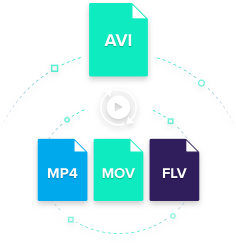
Maybe you have a ton of AVI files and want to edit AVI in iMovie, or play these files on your iPad, iPod or iPhone, etc. Apple, unfortunately only plays a couple types of seldom-used AVI file. But if your AVI files are the much more common AVI file type, encoded with a codec that QuickTime can't recognize. In this case, you'll need to convert AVI to MOV or other iOS and Mac OS compatible formats.
In this post, you will learn:
Part 1. How to Convert AVI to MOV (QuickTime Friendly Format) on macOS 10.7 and Later
Want to convert AVI to MOV so as to play AVI videos on QuickTime or other programs? Take it easy. Here you can use this professional yet easy-to-use UniConverter to do the AVI to MOV Mac converting task. This program enables you to convert any video or audio in all popular formats with ease.
Best AVI to MOV Converter - UniConverter
-
Convert AVI to QuickTime MOV, FLV, MP4, WMV, M4V, 3GP, VOB and 150 more standard/HD video formats.
-
Convert AVI to MOV without losing quality; batch process supported at 90X faster speed.
-
Inbuilt video editor which enables you to personalize AVI videos before conversion by features like trim, crop, add effects, etc.
-
Transfer converted AVI files to various mobile devices simultaneously easily with USB cable connected.
-
Download online videos from Facebook, YouTube, Vevo, Vimeo, Metacafe, Dailymotion and 1,000 sites more.
-
Burn or copy any video to DVD as backup if you want.
-
Provide with a set of useful handy tools like GIF maker, VR converter, cast to TV, screen recorder, etc.
-
It works on macOS 10.7 Lion to 10.15 Catalina, or Windows OS.
[3 Steps] How to Convert AVI to QuickTime MOV on Mac
It supports iMac, Mac Pro, MacBook, MacBook Pro, MacBook Air either with macOS 10.15 Catalina, 10.14 Mojave, 10.13 High Sierra, 10.12 Sierra, 10.11 El Capitan, 10.10 Yosemite, 10.9 Mavericks, 10.8 Mountain Lion or 10.7 Lion. Please free download it and now let's begin.
Step 1. Load AVI videos to iSkysoft AVI to MOV Converter
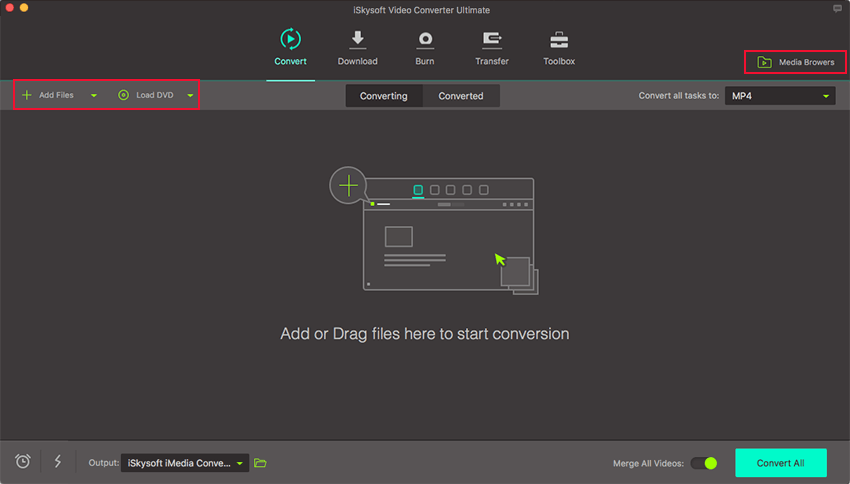
To do so, simply install UniConverter on your computer. Then you can directly drag & drop AVI files to the this AVI to MOV covnerter. Or you can head to the Add Files button to locate the AVI files into the software. Click the drop-down icon beside if you have AVI videos in your mobile devices, which allows you to directly load from there.
Bonus: Batch AVI to MOV conversion is available, so you are able to add more than one file at one time. By the way, if you wanna combine several files into one for better enjoyment, you can enable "Merge All Videos" option at the bottom of the main interface.
Step 2. Select "MOV" as the output format
Now you need to choose MOV format from the format tray and all your imported AVI files will be converted to MOV files. Simply click Convert all files to > Video > MOV , and then choose a resolution for the MOV video. The Same as source will allow you to keep the original quality.
Tips: If you want to put the output MOV files on your iPad, iPhone, iPod, Apple TV or other devices, you can choose the presets format offered in the Device category of format tray.
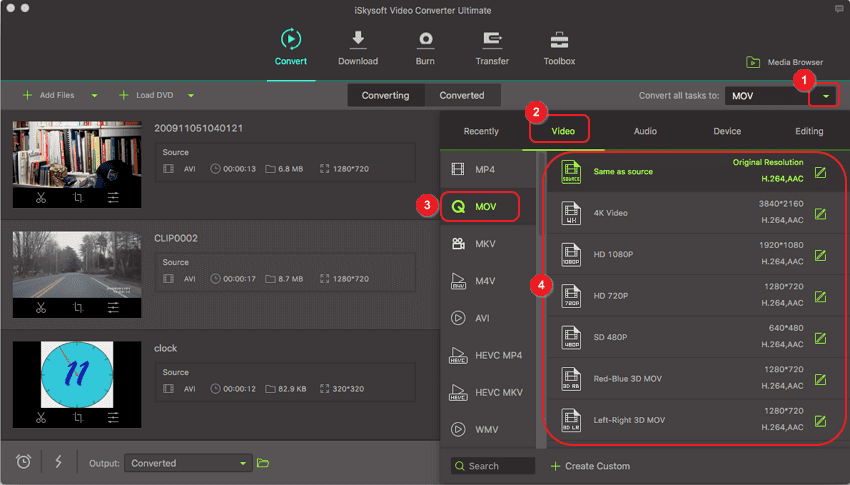
Note: The AVI to MOV Converter additionally offers you some useful edit functions for making your videos more enjoyable. You can split, crop, add cool effects to your media files or capture your favorite scene of the video.
Step 3. Start to convert AVI to MOV for QuickTime
Hit the Convert All and let this smart AVI to MOV Video Converter do the rest for you! After a few seconds, you can find the MOV files in the Covnerted tab. Now the AVI files have been converted to MOV format!
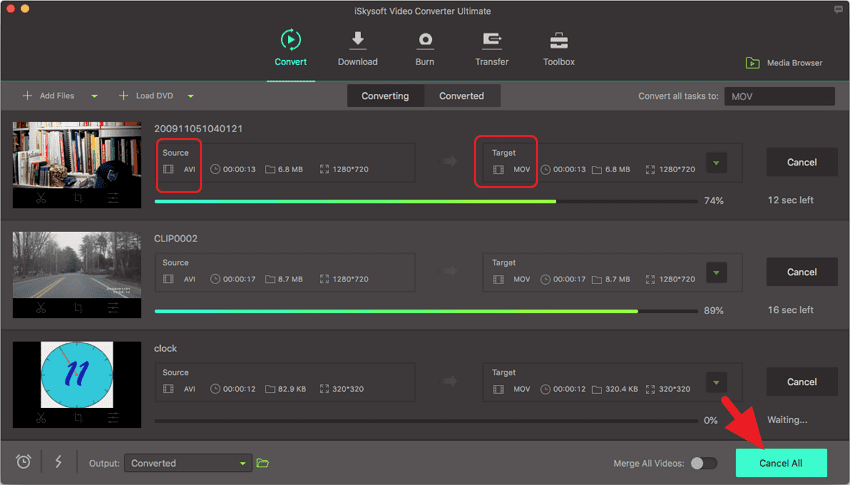
When the conversion is done, you can play the output MOV videos in QuickTime, edit them in iMovie, Final Cut Pro, or put them on your iPhone X/8/8 Plus/7/7 Plus, iPad Pro for playback whenever you like. That is all about how to convert AVI to MOV with iSkysoft MOV converter.
It is cool, right? Have a nice media experience then! By the way, if you want to convert MOV to AVI, please check this page to get detailed guide.
Video tutorial on how to convert video in UniConverter
Part 2. How to Convert AVI to MOV Online Free
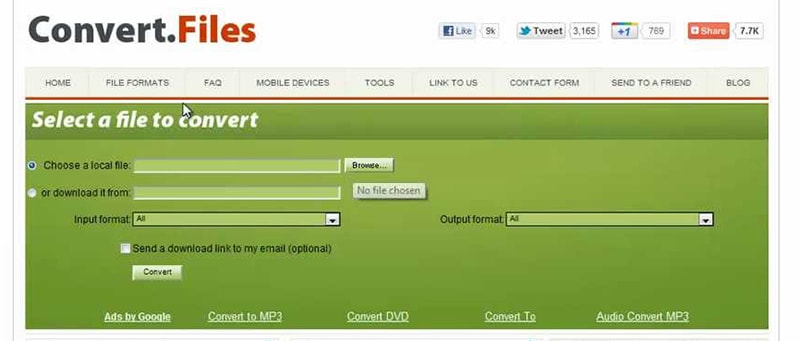
Not every player or device supports all types of formats. By default, your Apple devices cannot play AVI, but you can easily convert your AVI video to MOV or vice versa in four simple steps through online AVI to MOV converter - convertfiles.com.
Before learning the steps, here are some limits for using online AVI to MOV converter:
-
Has limited video format, size, length and the output format.
-
The conversion speed is slow and depends on the Internet.
-
Won't support batch conversion.
-
Users have to download the converted files, which give chance to virus.
-
Has ads on the page.
Follow these simple, easy to execute steps and convert AVI to MOV online free
in minutes:
Step 1. First of all, upload the AVI file you want to convert. You can browse from your system’s files or can download it by entering the URL.
Step 2. Select MOV as the Output Format.
Step 3. Hit the "Convert" button. The file will convert almost at once unless your file is super heavy.
Step 4. A download link will then appear on the screen. Download the output file from that link right away. Future usage or accessing your file at a later time, you also have the option to get the link to your converted file in your email inbox.
Part 3. AVI vs MOV
When compared, both AVI and MOV have their pros and cons. Some noteworthy differences between these two famous file formats are:
-
AVI is a classic yet popular container format. It’s compatible with almost all players, external devices and smartphones. Apple developed MOV for its QuickTime and MacOS applications, and its proprietary issues restrict its application across different devices.
-
MOV files are smaller in size as compared to AVI.
-
MOV supports multiple tracks and videos can have subtitles, but AVI doesn’t allow these.
-
The widespread use and compatibility of AVI across devices make it a common format as compared to MOV.
-
AVI is one of the oldest file formats for video data but not quite compatible with Apple products. However, now you know where to find your handy online AVI to MOV Converter.
Why Choose UniConverter for Mac/Windows
 Free Trial
 Free Trial
Brian Fisher
staff Editor