/ Posted by to
by Brian Fisher • • Proven solutions
A number of HD videos downloaded from the internet are wrapped up in MKV container and you can play them on Mac using a media player like VLC, or Quicktime with Perian plugin. But you will certainly stumble if you try to import them to iTunes for easy syncing with other iDevices. iTunes is very picky about what kind of formats can be imported into it, and only a few of media formats are supported by iTunes, including MOV and MP4. To add MKV to iTunes, you need to convert MKV to iTunes compatible format first. Here is where UniConverter comes in.
- Part 1. How to Convert and Add MKV to iTunes
- Part 2. How to Add MKV to iTunes using VLC
- Part 3. How to Import MKV to iTunes in HandBrake
Part 1. How to Convert and Add MKV to iTunes
UniConverter supports converting video from all regular format to iTunes compatible formats, whatever it's MOV, MP4 or M4V. What's more, if you want to play MKV video on your iPad, iPhone, iPod, you can directly select the device model as the output format. No manual video settings are required. All Apple devices are supported, including iPad Pro, the New iPad, iPad with Retina display, iPhone X/8/8 Plus/7/7 Plus/SE/6s(Plus)/6(Plus)/5s/5c/5/4s/4/3GS, iPod touch 5, etc. Now get the best MKV to iTunes converter to add MKV files to iTunes library as needed.
Get the Best MKV to iTunes Video Converter - UniConverter
- Convert MKV to iTunes supported format with three simple steps.
- Easily convert MKV videos so as to play them on various devices, including iPhone, iPad, Android phones, etc.
- Burn MKV videos to DVD with ease.
- Directly download videos from 1,000+ online video websites, like YouTube, Facebook, Vevo, Vimeo, Metacafe, and so on.
- Compatible with Windows 10/8/7/XP/Vista, macOS 10.13 High Sierra, 10.12 Sierra, 10.11 El Capitan, 10.10 Yosemite, 10.9 Mavericks, 10.8 Mountain Lion and 10.7 Lion.
User Guide on How to Add MKV Files to iTunes Library
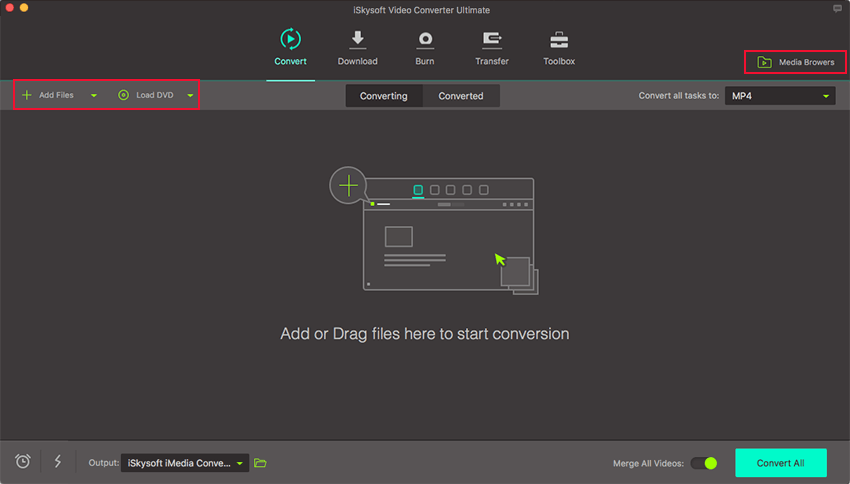
Step 1. Load MKV videos into MKV to iTunes converter
You can drag any MKV file in Finder and drop to the program or add them by clicking "Add Files" on the main menu. It allows you to add several video files at a time and convert them at one go.
Step 2. Select an iTunes compatible format
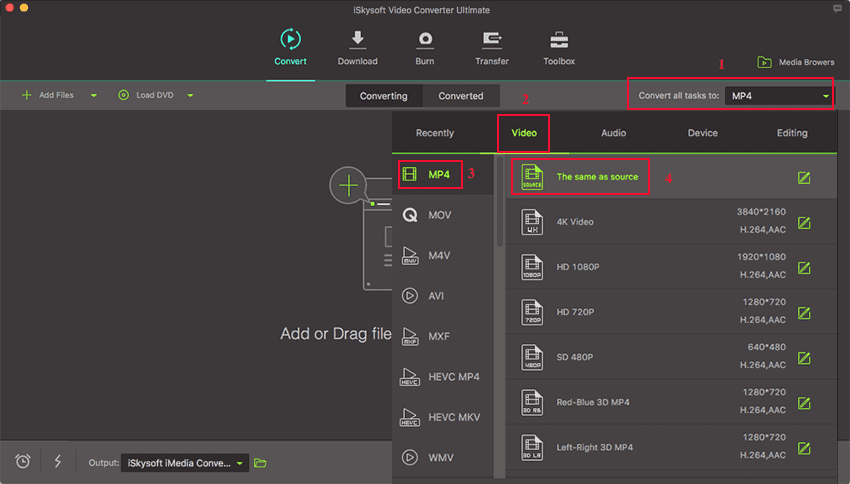
In the format tray, switch to Video category and choose M4V or MP4 as your output format. You can also specify an output folder. Otherwise, the default folder will be used.
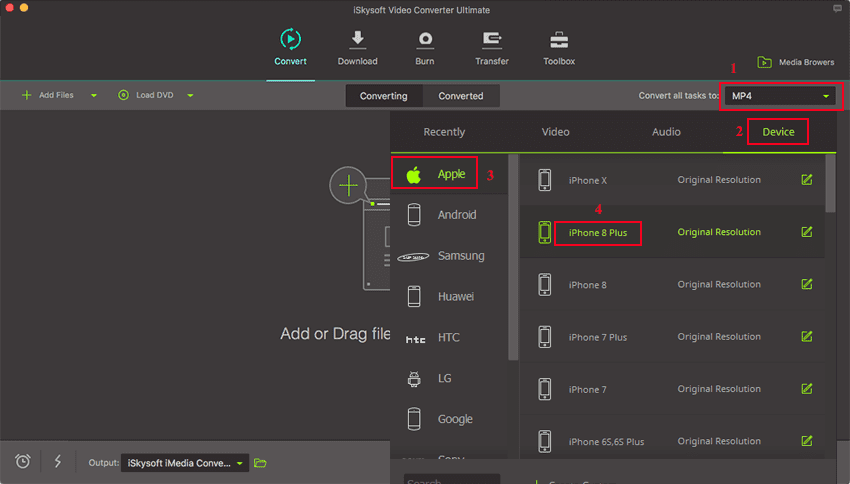
If you want to sync the converted video to a specific devices like iPhone, iPad, iPod or other devices, you can choose your device model from an array of device-specific profiles.
Your original videos comes in several parts and you want to combine them into a single video file for continuous playback? Just turn on the "Merge" option at botton, then your video will be merged into one automatically after conversion. On the other hand, you can also cut a big MKV video file into smaller video clips. In addition, the bundled video editor allows you apply different special effects to your video. Another interesting feature is its ability to extract audio contents from MKV video or other video source to MP3, AAC formats.
Step 3. Add MKV to iTunes on Mac
Click the "Convert" button to initiate the conversion. The resulted videos will be smaller in file size, leaving more free space for your other multimedia contents. It fully supports Sierra so if you're using this version of macOS, you'll benefit more on MKV to iTunes conversion.
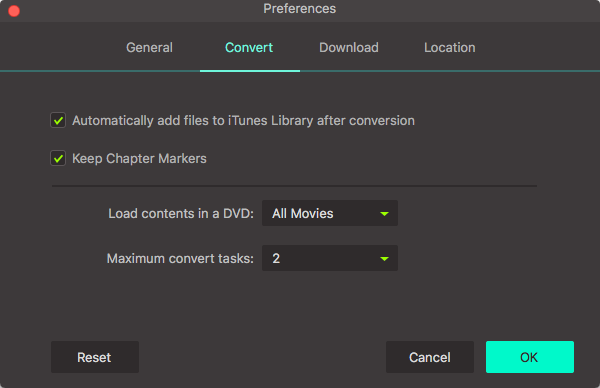
By the way, if you want to add MKV to iTunes after conversion, please go to the "File" menu then choose "Preference". Click on the "Convert" tab, you will see an option "Add files to iTunes Library after conversion". Mark it, then you will get the converted video on your iTunes list after hitting the "Convert" button to convert MKV videos.
Video Tutorial: How to Convert MKV to iTunes on Mac
Part 2. How to Add MKV to iTunes using VLC
The VLC media player also allows you to convert and import MKV to iTunes. VLC is an open source media player that support many media formats. Other than that, it can be used to convert or stream media files to different formats. You can convert videos to MP4 format and audios to MP3 format using VLC media player. With VLC you have to convert your MKV file to iTunes compatible format such as MP4. You are wondering how? Relax below is a guide on how to convert MKV to iTunes.
Step 1. Download and install the VLC media player on your computer if you don’t have it. If you have installed it, go ahead and launch it on your computer.
Step 2. On the VLC window, go to the main menu and click on “File” button and then click on “Convert/Stream” button.
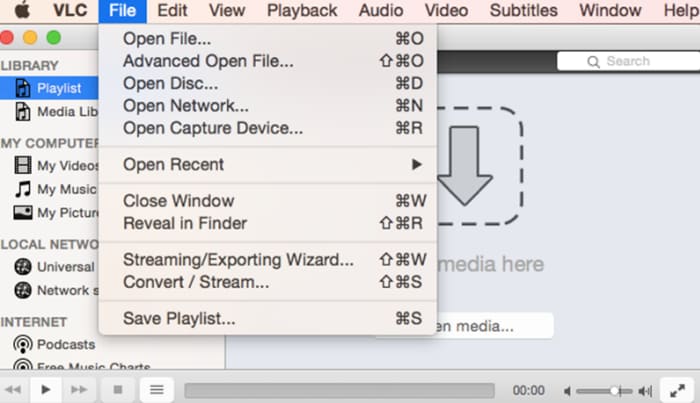
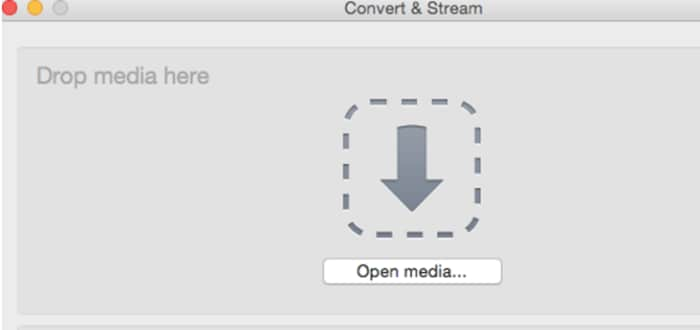
Step 3. You will see a new window, and the first thing to do is to add MKV files to the VLC. Click on “Open media” and browse the MKV media files from your computer.
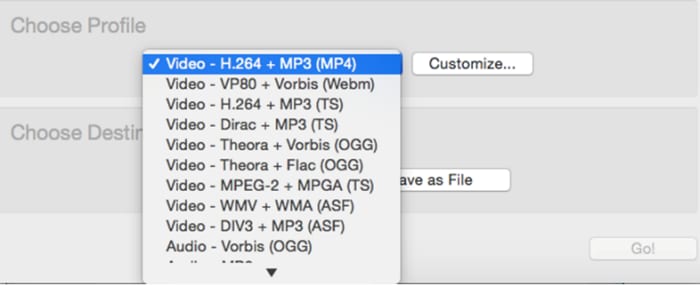
Step 4. Next, you have to choose iTunes format. Under Choose profile click on the options icon and select “Video- +MP3 (MP4)” option which is compatible with iTunes.
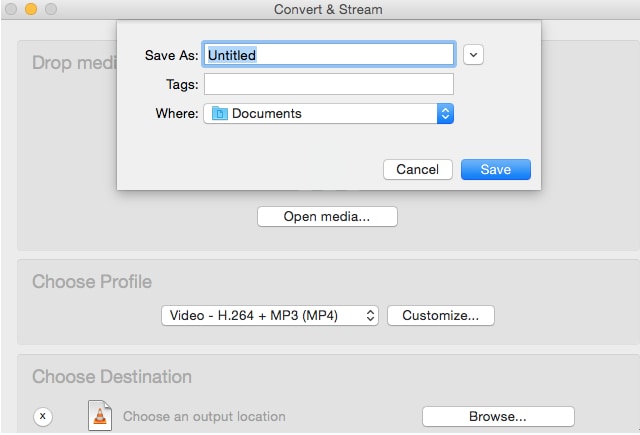
Step 5. After that, you have to define where to save the MKV file that needs to be converted to iTunes. Click on “Save As” under “Choose Destination” and select a place to save the file. VLC will convert MKV to iTunes format
Step 6. Once you have converted the file, you can go to the folder that you defined earlier.
Step 7. Click on file and open with iTunes media file. Alternatively, you can drag and drop the files to the iTunes program directly. You can then play the MP4 on iTunes and enjoy watching them.
Part 3. How to Import MKV to iTunes in HandBrake
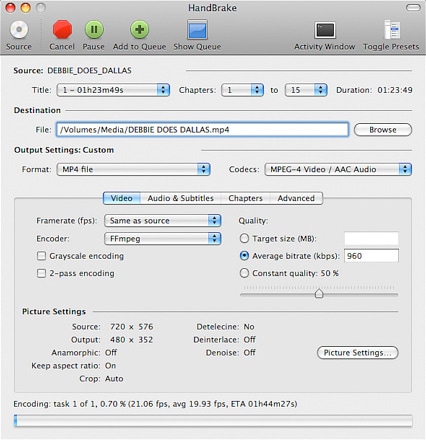
Handbrake is popular free open source software that allows one to convert files as well as video codecs. It is a useful software that can also convert and import MKV to iTunes compatible formats. This software might look difficult to use for first time users but in the guide below we have simplified how to use it. Here is how to convert and import MKV to iTunes with Handbrake software.
Step 1. Go to Handbrake website on your browser and download the program either on your Mac or Windows computer. You can then install on it on your computer.
Step 2. Open Handbrake software on your computer and click on “Source” button and then click on “File” icon. You can then upload your MKV file to the program.
Step 3. After that, you can then go to “Destination” and click on “Browse” to search for and select a folder to your computer where you will save the uploaded file.
Step 4. Go to output settings, and then select container format as “MP4” format.
Step 5. You can then click on “Start” button at the top near source menu and Handbrake will convert MKV to iTunes compatible format.
Step 6. Now go to your computer and locate the MP4 files.
Step 7. Open the iTunes media player on your computer. Ensure it is up to date.
Optional: Online MKV to iTunes Converter
You can also try online video converter to convert MKV to iTunes, if you don't want to install a computer program. Try it below:
Brian Fisher
staff Editor