/ Posted by to
by Brian Fisher • • Proven solutions
iMovie is a good software to edit video clips from camcorder or camera on your Mac and it comes with the ability to stabilize shaky clips exported from your camera or camcorder. But if you are an experienced iMovie user, you may learn that it is not so easy to import MTS to iMovie. iMovie ought to accept most of the popular HD cameras or camcorders, such as Panasonic HDC-HS30, Canon VIXIA HF200, which capture videos in M2TS/MTS format, but sometimes you may get errors from iMovie when importing MTS/M2TS to iMovie.
Convert MTS or M2TS Files to iMovie for Editing
For many Mac users, they sometimes may come across difficulty when importing M2TS or MTS video files to iMovie, especially when importing some raw MTS video files though they have followed the step-by-step instructions from iMovie. Their camcorders just cannot be recognized at all. For this case, you can convert MTS to iMovie by using a professional MTS iMovie application: UniConverter for Mac, which will accomplish the MTS or M2TS conversion easily, with ultra fast speed and loss-less video quality.
UniConverter - MTS to iMovie Video Converter
Best Conversion Tool to Help Edit MTS/M2TS Files on iMovie.
- In addition to MTS/M2TS, supports to convert 150+ videos or audios of different formats to iMovie.
- Convert MTS/M2TS for various editing apps on Mac, like iMovie, Final Cut Pro, QuickTime, etc.
- Download or capture online videos from YouTube, Vimeo, Vevo, Facebook and 1,000+ video sharing websites.
- Directly convert videos to preset format for mobile devices and then transfer converted video to devices with USB.
- Support essencial editing features like Trim, Crop, Rotate, Effects, Watermark, Subtitle, etc.
- Offer a set of handy tools for convenience like GIF Maker, VR Converter, Screen Recorder, Video Metadata Fix, etc.
How to Convert MTS/M2TS to iMovie Format in Steps
Step 1. Import MTS Files to the video converter
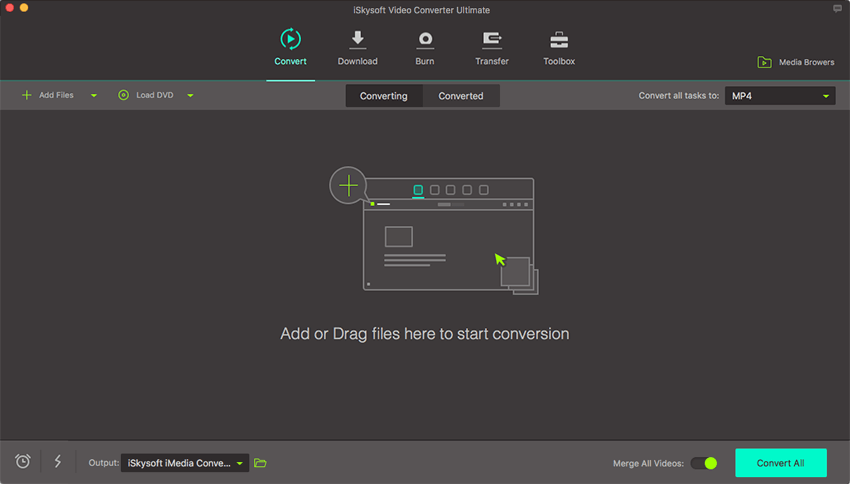
Click "Add Files" button on the top left corner to import the MTS files in your Mac or Windows, or simply drag and drop M2TS/MTS files you want to this MTS to iMovie converter. This MTS iMovie converter also supports to import MTS videos directly from your camcorder, just click the drop down icon beside to see more options.
Step 2. Select "iMovie" as the Output Format
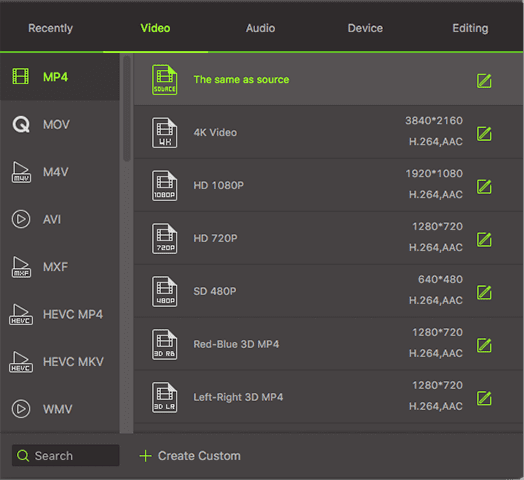
On the main interface, go to format tray of the iMovie MTS converter and select "Editing" tab, then click the "iMovie" icon to set it as output. The proper Frame Rate, Bit Rate, Resolution and other settings will be set by default and keep original quality of your video. You are able to import the output MTS or M2TS video to iMovie 08/iMovie 09/iMovie 11/iMovie HD on Mac Lion, Snow Leopard, Mountain Lion, Mavericks, Yosemite, El Capitan and Sierra.
Note: If you only would like to edit certain segment of your MTS video, you are able to trim the video with this program. Of course, if you need to combine several files, check the "Merge All Videos" on the main interface of the app. Some other features, say changing video effect, cropping black borders, adjusting video effect are available too.
Step 3. Start to Convert MTS/M2TS to iMovie on Mac
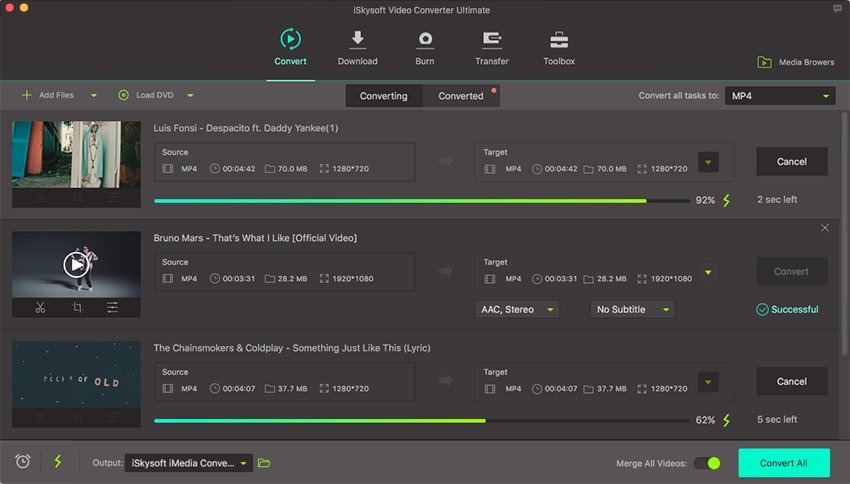
Last, click the "Convert All" button to start MTS/M2TS to iMovie conversion. That's all you are required to do. In fact, this MTS to iMovie video converter can help you do more.
This powerful MTS iMovie Video Converter supports automatically turn off your Mac when the conversion is finished, so you don't have to wait around when processing the conversion. Just set "shutdown" when task is complete in Time Scheduler on bottom left. Now, the converted MTS files can be imported to iMovie for editing, organizing, or sharing successfully.
Optional: Online MTS/M2TS to iMovie Converter
If you don't want to install a computer program, you can also try online video converter to convert your MTS/M2TS videos to iMovie supported format. Try it below:
Note: Because the online tool doesn't support "https", so if the content below was blank, please manually click the "Shield" icon on the right of your browser address bar to load the script. This action is secure without any harm to your data or computer.
Brian Fisher
staff Editor